
TikTok Pixel Setup Guide 2026: Pixel, Events API & Testing

By :
Ali
August 24, 2026
I spent $3.5k optimising against conversion data that was counting every purchase twice.
The pixel was firing. The Events API was firing. Both were working perfectly, and together they were lying to me — because I hadn’t passed an event_id.
Reported conversions doubled. Cost per acquisition halved on paper. The bidding algorithm trained on a signal that didn’t exist.
I’ve run TikTok ads for four years as an official TikTok for Business partner.


This is the setup guide I wish I’d read first.
✅ Bottom Line Up Front on TikTok Pixel
- Three things must match for deduplication to work: Pixel Code, Event name, and Event ID. Not event time — that’s a common misconception.
- The windows that decide everything. Two matching events arriving within 5 minutes get merged and enriched. Between 5 minutes and 48 hours, the second is dropped. After 48 hours, it counts as a separate conversion. That’s your double-counting failure.
- Two event names changed on 1 May 2025. CompletePayment became Purchase. SubmitForm became Lead. Old code still works, but new setups should use the new names.
- The trap in Events API setup: IP address and user agent are sent automatically by the Pixel. For Events API they require manual configuration. Miss it and your match quality drops.
- Run both channels. TikTok’s own recommendation is Pixel and Events API together, deduplicated.
1. Install the Pixel Properly
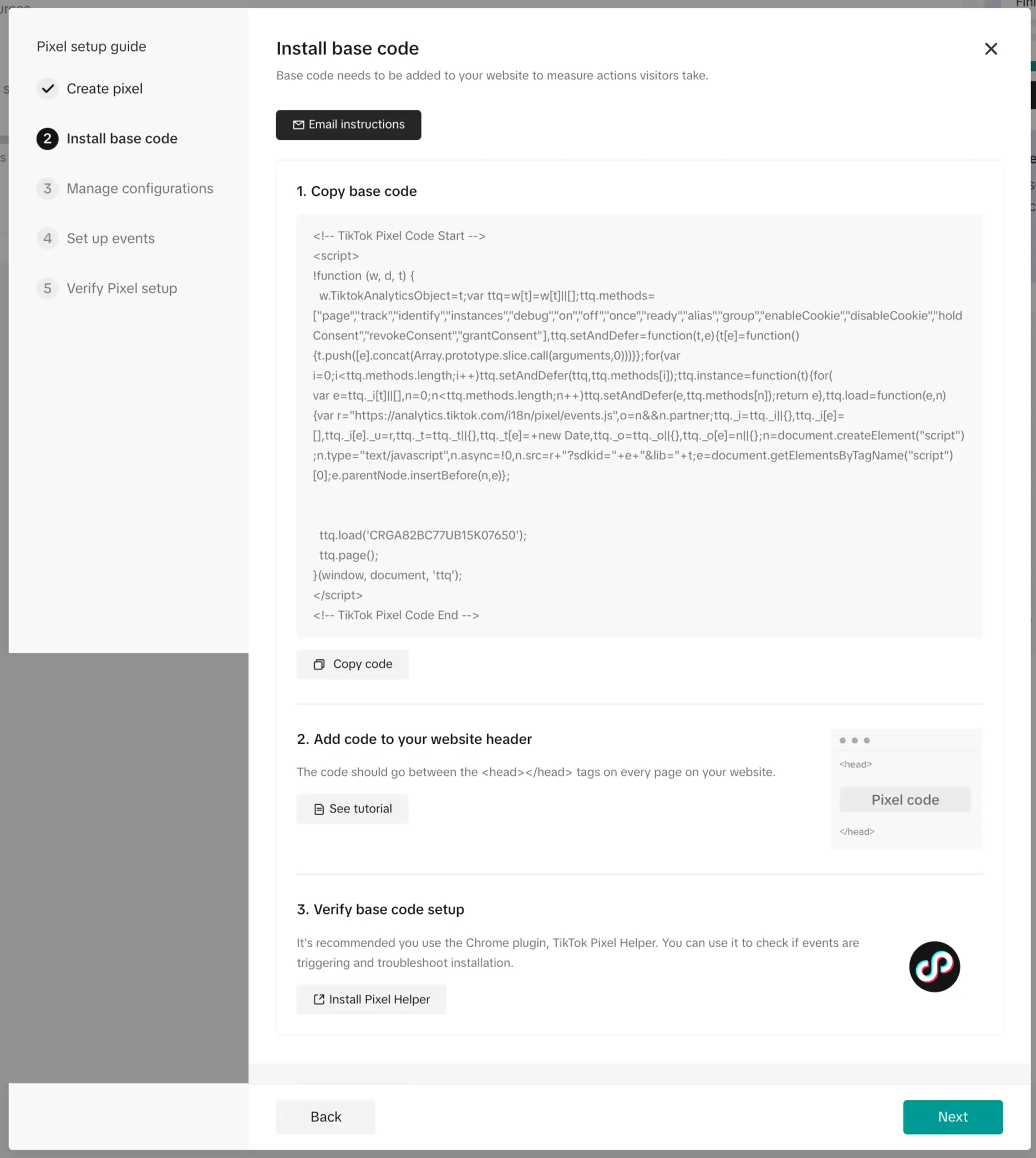
The path inside your TikTok Ads Manager account: Tools → Events Manager → Connect Data Source → Web.
- Then choose Partner Integration if you’re on Shopify, WooCommerce, Google Tag Manager or similar. Choose Manual Setup if you’re placing code yourself.
- Where the base code goes matters, and TikTok is explicit. Place it “as early as possible on the webpage, ideally between the <head></head> tags.” If it lands in the body or loads late, Pixel Helper flags it and your event capture suffers.
- Name it after your domain. Maximum 128 characters. Future you, staring at “Pixel 1,” “Pixel 2” and “Pixel 3,” will be grateful.
- Use one pixel per website. TikTok’s own FAQ says multiple pixels are possible but “may slow down the page speed” and recommends one. I’ve never found a good reason to break that rule.
- Then configure events, either through Event Builder — a visual UI with no coding, offering Value, Currency, Content ID and Content Type — or Custom Code, which generates the implementation for you.
TikTok’s help centre calls these Event Builder and Custom Code. It does not use the term “Developer Mode” for web pixels, whatever a third-party guide tells you.
Four things to know before you start testing:
- Configuration changes take up to 30 minutes to take effect.
- You cannot delete an event that has been connected to an ad group — even a deleted ad group.
- You cannot delete a pixel once it has run a campaign. Ever.
- After 7 days with no activity, an event’s status switches to “No recent activity.”
That third one is why naming matters. You’re living with these forever.
2. The Event Names That Changed
This catches people running setups built before mid-2025, and it’s the first thing I check on any account audit.
Effective 1 May 2025:
| Old name | New name | Status |
|---|---|---|
| CompletePayment | Purchase | Renamed, auto-converted on the backend |
| SubmitForm | Lead | Renamed, auto-converted on the backend |
| ClickButton | — | Deprecated, sunset in 2027 |
| PlaceAnOrder | — | Deprecated, sunset in 2027 |
TikTok’s position: “Existing setups remain operational. You do not have to rename any code.” The deprecated pair keeps working until 2027.
But historical data cannot be transferred from ClickButton or PlaceAnOrder to new events. So migrate when you’re ready to lose the continuity, not in the middle of a campaign.
The current standard events, case-sensitive:
AddPaymentInfo · AddToCart · AddToWishlist · ApplicationApproval · CompleteRegistration · Contact · CustomizeProduct · Download · FindLocation · InitiateCheckout · Purchase · Schedule · Search · StartTrial · SubmitApplication · Subscribe · ViewContentThree of those are new as of the 2025 update: StartTrial, SubmitApplication and ApplicationApproval.
One inconsistency worth knowing about. TikTok’s standard events page still lists SubmitForm as current, while the migration page says it became Lead. Neither page lists Lead in its table — though Lead does appear in TikTok’s offline events documentation. Both strings work. Lead is the forward-looking one.
On custom events: maximum 50 characters, letters, numerals, underscores and dashes only, must start with a letter. And the limitation that matters — custom events cannot be used for campaign optimisation. Reporting and audiences only.
3. Parameters, and the Two That Break Most Often
TikTok doesn’t publish a blanket required-parameter list. Requirements are scoped to what you’re doing.
- Required for Video Shopping Ads: content_type, contents, content_ids, currency.
- Required for ROAS and Value-Based Optimization: price and value.
Recommended everywhere else: quantity, content_name, content_category, delivery_category, search_string, description, status, attribution_share (0.0 to 1.0), and customer_type (new or returning).
Now the two that break constantly.
content_type accepts exactly two values: product or product_group. Lowercase, no variation. Send anything else and Pixel Helper throws “Content Type invalid.” I’ve seen Product, products and item in production code. All fail silently until you look.
value must be a number greater than zero with no special characters, currency symbols or commas. $1,299.00 fails. 1299.00 works. This one breaks on locale-formatted output more than anything else.
A naming inconsistency to be aware of. TikTok’s current standard events page uses content_ids (plural). Older TikTok-hosted integration guides use content_id (singular). There’s also a contents array. Check which your integration expects rather than assuming.
Currency must be a supported ISO 4217 code. TikTok publishes the full list — 60-plus codes including USD, EUR, GBP, INR, AED, SGD, JPY and BRL. An unsupported code throws “Currency code invalid/not supported.”

💰 Before You Send Real Traffic Through It
A properly configured TikTok Pixel delivers more accurate campaign data when you start spending real money. Make sure your tracking setup is ready before scaling ads.
New TikTok advertisers may access up to $6,000 in ad credits. Credits are issued after qualifying billed spend and eligibility depends on your registration method.
CHECK CURRENT TIKTOK FOR BUSINESS OFFER →4. Advanced Matching
Advanced matching is how TikTok connects a conversion on your site to a person who saw your ad. Weak matching means weak attribution, weak TikTok ads targeting, and weak optimisation.
Two modes.
- Automatic Advanced Matching finds form fields on pages where the pixel is installed and matches customer information automatically. Enable it at Events Manager → Data Sources → your pixel → Settings → Automatic Advanced Matching.
- Manual Advanced Matching gives you control over exactly which parameters you share. TikTok notes it “requires technical resources and coding experience.”
AAM collects email, phone number, name, city, state, zip code, country and external ID. Notably not street address.
One caveat that catches people. AAM “activates when a designated event occurs on a page where Pixel is installed.” No event fires, no match keys collected. Installing the pixel isn’t enough on its own.
The five Events API match keys:
- Click ID (ttclid) — appended to the URL on every ad click
- Email and phone — hashed, enabling advanced matching
- External ID — your loyalty IDs, customer IDs, external cookie IDs
- IP address and user agent
- First-party cookie — the ttp cookie, scoped to your domain
Number four is the trap. TikTok’s own wording:
So your browser-side events carry IP and user agent automatically. Your server-side events don’t, unless you configure it. That gap quietly degrades your match quality, and nothing warns you.
On hashing: SHA-256, performed in the user’s browser before data reaches TikTok, transferred over HTTPS. Phone numbers use E.164 format.
On normalisation — lowercase, trimming whitespace, stripping symbols — TikTok’s help centre doesn’t publish the rules. They live in the developer portal. Partner documentation is consistent about lowercase-and-trim, but I’m flagging it as not directly documented rather than stating it as fact.
Event Match Quality appears in your Events Manager Overview tab. TikTok publishes exactly one sentence about it: the score is “calculated using a weighted average of all your match key coverages.” No published scale, no published thresholds. If someone tells you to target a specific EMQ number, they’re inventing it.
5. Events API: Why Browser-Only Under-Reports
The Events API is “a secure server-to-server interface that allows advertisers to share the actions customers take on their websites directly with TikTok.”
Why it exists, in TikTok’s own words:
Ad blockers, tracking prevention, cookie restrictions, and users closing the tab before the pixel fires — every one of those loses a browser-side conversion. The server doesn’t have those problems.
Three setup routes through the TikTok ads API:
- Commerce partner integration — Shopify, WooCommerce and similar. Easiest by a distance.
- Data partner integration — CDPs, tag managers, CRMs.
- Direct API integration — full control, most work.
Events API 2.0 is now the recommended endpoint for reporting from all sources: web, app, offline and CRM. TikTok consolidated the previously separate endpoints in November 2023.
On authentication: you need an access token, and TikTok’s help centre says there are two ways to generate one without giving a click path. It sends you to the developer portal. Budget time for that step.
If you use Google Tag Manager, TikTok maintains its own server-side template. Two routes: the interactive setup through Events Manager, which auto-configures everything, or manual installation from the GTM Template Gallery into a server container.
Use the interactive flow. It configures your event_id variable automatically, which — as the next section explains — is the single thing most likely to go wrong.
6. Deduplication, Properly Explained
This is the section that would have saved me money, and it’s the one almost every guide gets partly wrong.
The rule, in TikTok’s words:
The three keys that must match
| Key | Must match |
|---|---|
| Pixel Code | Same pixel or data source on both channels |
| Event name | Byte-identical, case-sensitive |
| Event ID | Byte-identical |
Note what isn’t on that list. event_time is not a matching key. Plenty of guides claim it is. It matters only for determining which event arrived first and whether the second falls inside the windows below.
The windows
- Pixel to Pixel: identical event and event_id within a 48-hour window from the first event are deduplicated.
- Events API to Events API: same rule, same 48-hour window.
Pixel to Events API is where it gets interesting. TikTok “merge[s] or deduplicate[s]” matching events arriving after 5 minutes and within a 48-hour window.
Here’s what that actually means in practice:
| Gap between the two events | What happens |
|---|---|
| Under 5 minutes | Merged. Fields present in the second event but missing from the first get filled in |
| 5 minutes to 48 hours | Dropped. Pure deduplication, no enrichment |
| Over 48 hours | Counted separately. This is double counting |
TikTok keeps the first event received for measurement and reporting.
Why this changes how you build
Firing both channels within five minutes of each other is strictly better than delaying the server-side send. You get deduplication and field enrichment — the server-side event fills in anything the browser missed.
Batch your server-side events with hours of delay and you still get deduplication, but you lose the enrichment. Batch them nightly across a day boundary and you can fall outside 48 hours entirely.
That’s the failure mode that cost me. Not a broken pixel. A working pixel plus a working API with no shared key between them.
The five ways deduplication fails
No event_id on one channel. No key, no dedup, everything counted twice.
- Different ID generation logic. A random UUID in the browser and an order ID on the server will never match. Use a deterministic value both sides can derive independently — the order or transaction ID is the obvious candidate.
- Different pixel codes. Dedup never triggers, even with perfectly matching event IDs.
- Event name mismatch. Purchase on one channel and CompletePayment on the other looks identical to a human and matches nothing.
- Server-side send delayed beyond 48 hours. Nightly or weekly batches drift outside the window.
- When you don’t need deduplication at all: different event types on different channels. AddToCart via pixel and Purchase via Events API don’t overlap, so there’s nothing to deduplicate.
7. Testing Before You Spend
Three TikTok ads tools. Use all three.
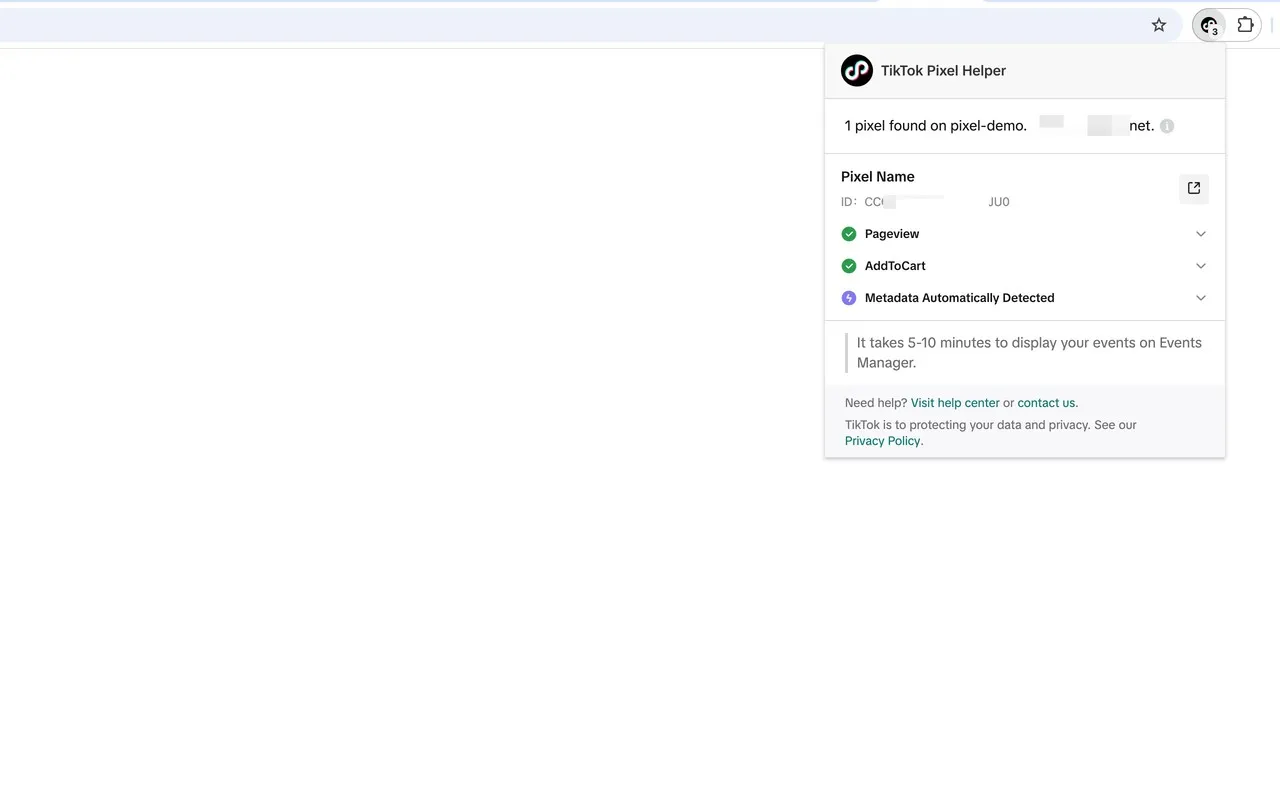
- TikTok Pixel Helper 2.0 is a Chrome extension that verifies installation and gives diagnostics at pixel, event and parameter level. Install it before you write a line of code.
- Test Events in Events Manager runs a live test environment that mimics how your site appears inside the TikTok app, without needing a QR code scan.
- The critical feature for deduplication: Test Events “allows you to filter between browser and server test events.” That’s where you visually confirm both channels are firing and carrying the same event_id. Do this before launch, not after.
- The Diagnostics tab identifies setup issues — missing parameters, missing content IDs — and gives you issue severity, affected datasets, impacted ads, and sample data from recent affected events.
TikTok doesn’t publish a full list of diagnostic issue types. The one concrete example in their docs is first-party cookies not being enabled. Any guide presenting a complete diagnostics error taxonomy invented most of it.
Expect latency. Event counts take up to 10 minutes to update. Full processing, and eligibility for campaign creation, takes up to 2 hours. Don’t panic in the first five minutes.
8. The Errors That Cost Me Money
TikTok publishes a complete Pixel Helper error table. Here it is, with what each one actually means.
| Level | Error | Fix |
|---|---|---|
| Pixel | Pixel code is not installed in header | Move it between <head></head> |
| Pixel | Invalid Pixel ID | Get the correct ID from Events Manager |
| Pixel | First-Party Cookies Not Found | Events Manager → Cookie Info → turn on first-party cookies |
| Event | Event name/type is empty | Include the event name in source |
| Event | Event name/type is invalid | Update to a valid standard or custom event |
| Parameter | Email format invalid | Fix the email parameter format |
| Parameter | Phone num format invalid | Use E.164 |
| Parameter | Missing email or phone for complete payment | Add the missing advanced matching parameter |
| Parameter | Value parameter format invalid | Number > 0, no symbols or commas |
| Parameter | Currency/Value parameter missing | Add both |
| Parameter | Currency code invalid | Use a supported ISO 4217 code |
| Parameter | Content ID value missing | Include a value for content ID |
| Parameter | Missing content ID parameter | Include the parameter itself |
| Parameter | Content Type invalid | Must be product or product_group |
The three that have cost me real money:
- The missing event_id. Covered above. Doubled conversions, halved reported CPA, bidding trained on fiction. It doesn’t throw an error — Pixel Helper won’t flag it, because both events are individually valid.
- “First-Party Cookies Not Found.” Easy to fix, easy to ignore, and it degrades matching across every event you send.
- Value formatting. A locale-formatted price with a currency symbol and a thousands separator fails validation on every purchase event. Your revenue reporting reads zero while your conversion count looks fine.
If events aren’t arriving at all, work TikTok’s sequence. Check you have permission on the pixel through TikTok Business Center, verify in Events Manager that data is received, confirm the event exists in your data connection, manually trigger one on your site, then wait — 10 minutes for the count, 2 hours for full processing.
On “ads not spending” — you’ll find plenty of blogs blaming the pixel. TikTok publishes nothing linking the two. The reasonable inference is that an optimisation event with no volume can’t exit the learning phase, and TikTok’s own guidance is to “give your ads a full 7 days to reach 50 conversions.” But that’s my inference, not TikTok’s documentation, and I’d rather say so.
💰 Worth Doing Before You Scale Spend
Get your Pixel and Events API deduplicating correctly before increasing your ad budget. Optimising campaigns with duplicated conversions can lead to inaccurate data and wasted spend.
If you are creating a new TikTok advertiser account, check the available offer first. Any promotional credit depends on your registration path and cannot be added retroactively.
SEE THE CURRENT TIKTOK FOR BUSINESS OFFER →9. Why Your Numbers Disagree With Google Analytics
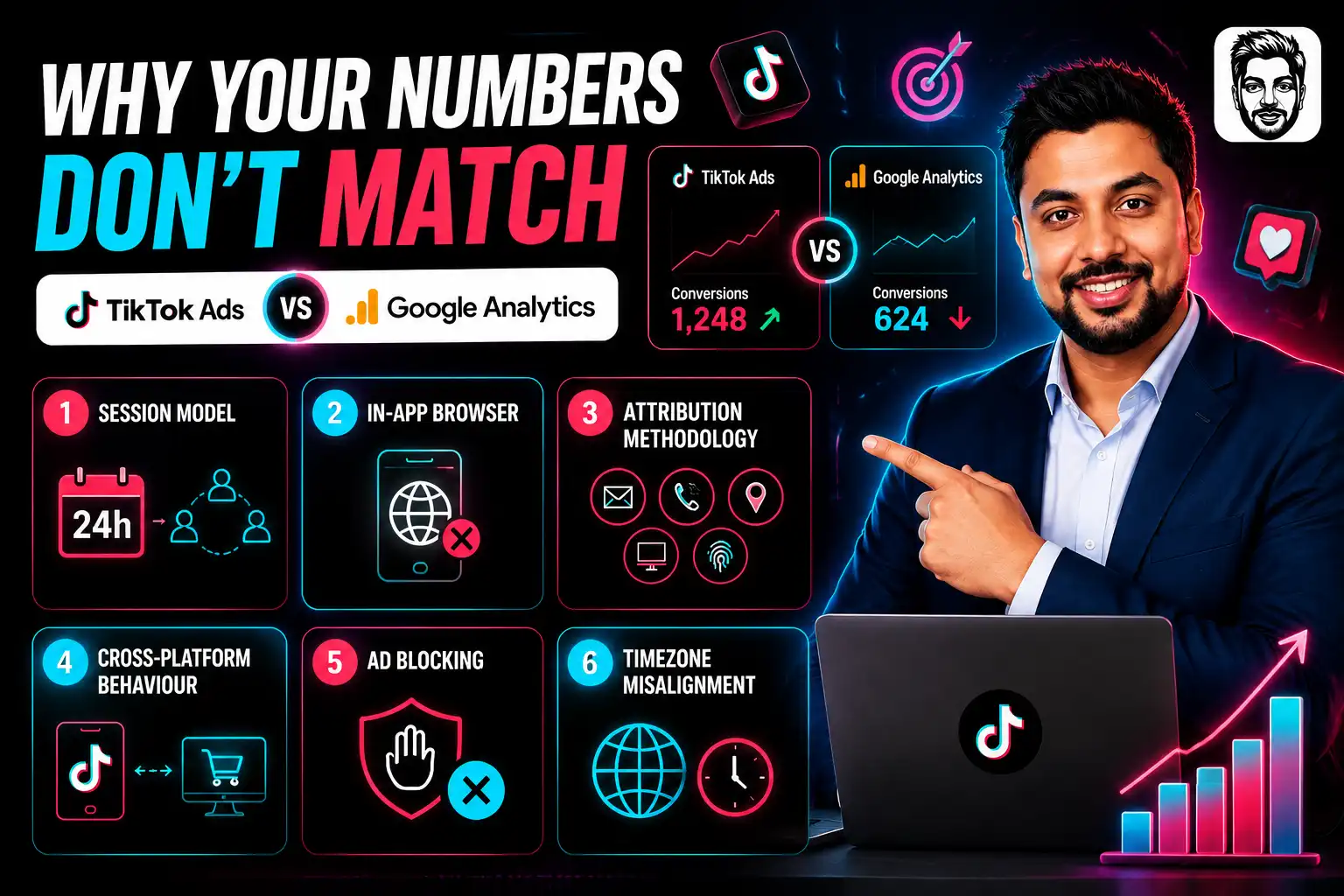
They always will, and TikTok documents six reasons.
- Session model. Google Analytics UTM tags are single-session. The TikTok pixel is multi-session, recording conversions within 24 hours of a click. GA typically needs the conversion to happen immediately.
- In-app browser. TikTok’s built-in browser can break referral tracking, so GA logs the visit as organic or direct.
- Attribution methodology. TikTok matches on email, phone, IP, user agent and other signals. GA relies on cookies and UTM parameters.
- Cross-platform behaviour. Discovery on TikTok, purchase on desktop later. Last-click gives TikTok nothing.
- Ad blocking. Blocks session tracking on both sides, unevenly.
- Timezone misalignment between the two accounts.
The practical fix: put UTM parameters on every TikTok landing page URL. It won’t make the numbers agree — nothing will — but it gives you a second dataset to reason with.
FAQs
Do I need both the TikTok Pixel and the Events API?
TikTok’s own recommendation is both, together, with deduplication. Browser-only tracking loses conversions to ad blockers and tracking prevention. Server-only loses the automatic IP and user agent signals.
What is the TikTok Pixel deduplication window?
48 hours from the first event. Within that, matching events are deduplicated. Under 5 minutes apart, they’re merged and enriched instead. Beyond 48 hours, the second counts as a separate conversion.
Can I delete a TikTok Pixel?
Not once it has run a campaign. You also can’t delete an event that has been connected to an ad group, even if the ad group is gone. Name things carefully.
Why is my TikTok Pixel showing “No recent activity”?
No observed activity for 7 days flips the status. Either traffic stopped, or the event stopped firing — check with Pixel Helper.
Should I still use CompletePayment?
Existing code keeps working, but new setups should use Purchase. Same for SubmitForm, which is now Lead. ClickButton and PlaceAnOrder sunset in 2027.
How many pixels should I install on one site?
One. TikTok allows more but warns it may slow your page, and recommends a single pixel per website.
What’s a good Event Match Quality score?
TikTok publishes no scale and no thresholds — only that it’s a weighted average of your match key coverages. Improve it by sending more match keys, especially hashed email and phone, on every event.
Can custom events be used for optimisation?
No. Custom events work for reporting and audience creation only. Optimise against standard events.

Aliakbar Fakhri
The founder of AFFINCO
Do These Three Things First
Put the base code between the <head> tags. Pass the same event_id through both channels. Confirm both are firing in Test Events, filtered by browser and server.
Everything else on this page is troubleshooting. Those three are the setup.
The most expensive pixel problem isn’t one that throws an error. It’s one where every component works perfectly and the total is wrong.
Verify the dedup before you scale the spend.
Affiliate Disclosure: This post may contain some affiliate links, which means we may receive a commission if you purchase something that we recommend at no additional cost for you (none whatsoever!)
Similar Posts



About the author:
Aliakbar Fakhri
Founder & CEO of AFFiNCO
I’m Ali, Founder of AFFiNCO, with 15+ years in SEO, paid ads and affiliate marketing.
I run 65+ sites of my own, so every strategy on this blog was tested on my money before it reached you. No guru fluff. Just what actually works.