
Claude Usage Limits 2026: Pro, Max and Team Plan Full Guide

By :
Ali
August 17, 2026

Anthropic doesn’t publish a single number for what you get.
Not one. No messages per session. No hours per week.
Go and look. Every limit on every plan page is a multiplier of another multiplier. Pro is “at least five times” Free. Max 20x is “20 times more usage per session than the Pro plan.”
Five times what, exactly? They don’t say.
I run 4 Max plans and 7 Team seats across my properties. My monthly Anthropic bill is $1650 per month I’ve spent most of this year trying to work out what I actually bought, and I’m going to save you that trip.
This isn’t a complaint post. The limits are workable once you understand the shape of them. But the shape isn’t what most people think it is, and two of Anthropic’s own support pages contradict each other on a load-bearing detail.
Let’s fix that.
✅ Bottom Line Up Front
There are two windows stacked on top of each other: a rolling 5-hour session limit and a weekly limit. Paid plans have both. Everything you do on web, desktop, mobile and Claude Code draws from the same pool.
Anthropic publishes no absolute numbers for either window. Only relative multipliers.
The fastest fixes, in order of how much they saved me: /clear between tasks, dropping to Sonnet 5 by default, cutting MCP servers, and keeping CLAUDE.md under 200 lines.
If you’re hitting limits daily on Max 20x, the problem is almost certainly session hygiene, not your plan.
What the Plans Actually Cost
Claude Pricing & Plans
Compare Claude individual, business, enterprise and API pricing.
Claude Subscription Pricing
Free
For occasional Claude use and getting started.
- Claude web, desktop and mobile apps
- Web search
- File uploads
- Projects
- 200K context window
Pro
More Claude usage for everyday work, research and coding.
- More usage than Free
- Claude Code
- Claude Cowork
- Unlimited projects
- Research features
- Access to more Claude models
Max 5x
Five times the Pro usage capacity for frequent Claude users.
- 5x Pro usage capacity per session
- Everything included with Pro
- Higher output limits
- Priority access during busy periods
- Earlier access to advanced features
Max 20x
Claude’s highest-capacity individual subscription.
- 20x Pro usage capacity per session
- Everything included with Max 5x
- Highest individual usage limits
- Priority during high-traffic periods
- For heavy Claude and Claude Code use
Team
Claude for organizations with centralized administration.
- 2–150 team members
- Claude Code and Cowork
- Central billing and administration
- Single sign-on (SSO)
- Enterprise search
- Mix Standard and Premium seats
Enterprise
Usage-based Claude access with enterprise security and administration.
- Annual billing
- Usage billed at API rates
- SCIM user provisioning
- Audit logs
- Role-based access
- Custom data-retention controls
Claude API Pricing
Pay-as-you-go pricing per million tokens (MTok).
Claude Fable 5
Anthropic’s highest-capability generally available model for long-running agents and demanding workloads.
Claude Opus 5
Built for complex coding, agents and demanding enterprise work.
Claude Sonnet 5
Fast Claude model balancing capability, latency and API cost.
Claude Haiku 4.5
Lower-cost Claude model for high-volume and latency-sensitive tasks.
I’m putting the prices in section one, not burying them at the bottom. Every number here is from Anthropic’s own pricing and support pages as of 7 August 2026.
| Plan | Price | Session limit vs Pro | Weekly limits |
|---|---|---|---|
| Free | $0 | 0.2x (Pro is “at least 5x” Free) | None published |
| Pro | $20/mo, or $17/mo billed annually | 1x (baseline) | One, across all models |
| Max 5x | $100/mo | 5x Pro | Two |
| Max 20x | $200/mo | 20x Pro | Two |
| Team Standard | $25/seat/mo, $20 annual | 1.25x Pro | One, across all models |
| Team Premium | $125/seat/mo, $100 annual | 6.25x Pro | Two |
| Enterprise | Seat fee + usage at API rates | No plan-level limit | None |
A few things that surprised me.
- Team Standard is barely better than Pro. It’s 1.25x Pro per session for $25 a seat. You’re paying the extra $5 for admin controls and shared context, not for headroom. If your team needs throughput, Team Premium at 6.25x is the real tier.
- Enterprise now has no usage limits at all. Anthropic moved it to a usage-based model where the seat fee covers access only and everything is billed at API rates. Legacy seat-based Enterprise plans convert at renewal. Self-serve Enterprise launched 12 February 2026, with a 20-seat minimum.
- Max has no published annual price. I looked. It’s monthly-only as far as Anthropic documents it. If someone quotes you an annual Max discount, ask them for the link.
One more thing worth knowing: those prices are web subscriptions. Anthropic states mobile-billed pricing may differ, and mobile subscribers can’t buy usage credits in-app.
The Two Windows, Explained Properly
The 5-hour window is rolling. It starts when you send your first message, not at a fixed clock time. Hit the cap and it resets five hours from that first message. This is the one people misunderstand — it isn’t a 9am reset for everybody.
The weekly window is fixed. Anthropic assigns your account a reset day and time, and it stays there. It doesn’t move when you renew or when you start using Claude. You get the full allowance each cycle.
Pro and Team Standard get one weekly limit that applies across all models. Max and Team Premium get two: one across all models, plus one that’s model-specific.
And everything shares a pool. Web, desktop, mobile, Claude Code, Cowork — one allowance.
I lost a week to this before it clicked. I’d burn my session in Claude Code, switch to claude.ai expecting a fresh start, and find the same wall.


Switching models with /model doesn’t help either. Anthropic is explicit: the session and weekly windows are shared across models, so /model doesn’t restore access. It only keeps you working after a model-specific limit message.
The Contradiction in Anthropic’s Own Docs
Here’s the load-bearing detail I mentioned. Read these three, all live on Anthropic’s site today.
So two plan pages say Sonnet. A best-practices page says Opus. The product ships an Opus error message.
My read is that the second weekly cap is on Opus and the plan pages carry a documentation error. The error string is the strongest evidence — that’s shipped code, not marketing copy. But I’m not going to state it as fact when Anthropic’s own pages disagree with each other.
If you’re budgeting around this, assume the constrained model is Opus and plan accordingly. Check your own reset times in Settings > Usage rather than trusting any page, including this one.
How to See Your Real Usage
Two places. Both worth knowing.

In Claude Code, run /usage. This is the single most useful command Anthropic ships and almost nobody I talk to uses it.
You get plan usage bars, activity stats, and a usage breakdown. Press d or w to toggle between the last 24 hours and the last 7 days.
The part that actually changed my behaviour is attribution. It shows recent usage broken down by skills, subagents, plugins and individual MCP servers, each as a percentage of total. That’s how I found out one MCP server was eating 37% of my session before I’d typed a word.
It also flags behaviours — long context, cache misses — when any one accounts for 10% or more of recent usage.
Two caveats. The figures are approximate, and they’re computed from local session history on that machine, so usage from your other devices isn’t included.
And the dollar figure shown isn’t your bill if you’re on a subscription. It’s an API-equivalent estimate.
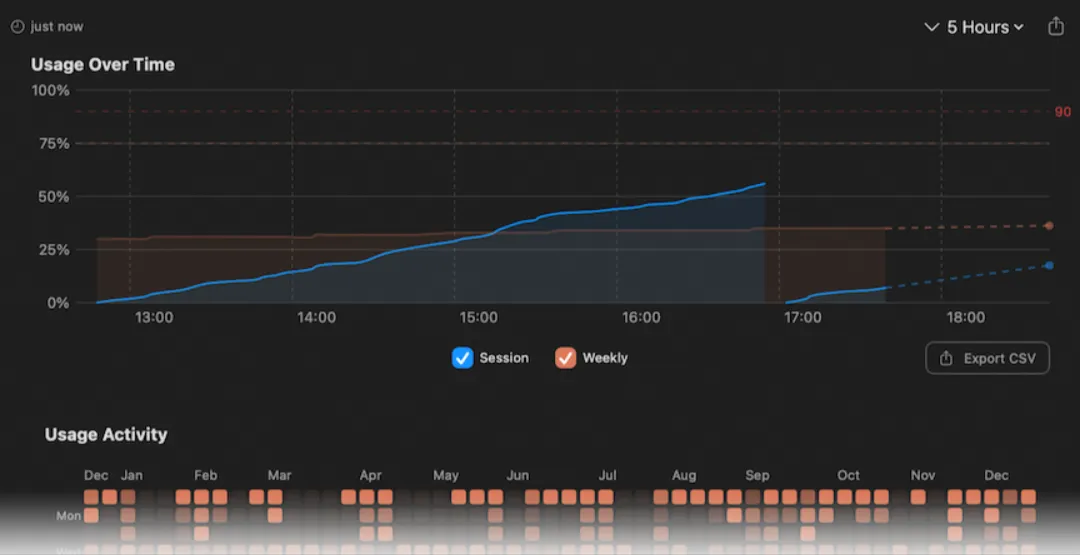
On the web, go to Settings > Usage. It shows how much of your five-hour session you’ve used, time remaining, and your weekly reset times. That’s the authoritative view for the shared pool.
Related commands worth having in muscle memory: /cost, /context, /usage-credits, /status.
Why Long Sessions Burn So Much
This is the mechanic that explains almost every “I hit my limit in twenty minutes” complaint.
The full conversation is re-sent on every request. At cached rates, but re-sent. So a one-line question in a session you’ve had open all day still draws usage for the entire conversation.
Take a break, come back, and the cache has expired. Now everything reprocesses at full price.
Anthropic’s cache TTL is one hour on a Claude subscription and five minutes on an API key. Here’s the gotcha nobody mentions: once you’re drawing on usage credits, the TTL drops to five minutes. The moment you start paying overage, your burn rate goes up.
Actions that invalidate the cache mid-task: switching models, changing effort level, turning on fast mode, connecting or disconnecting MCP servers, enabling or disabling MCP-providing plugins, and running /compact.
Actions that are cache-safe: editing repo files, invoking skills and commands, /recap, /rewind, permission-mode changes, and spawning subagents.
And note the asymmetry — /compact is itself a large request. /clear costs nothing.
The 9 Changes That Cut My Burn

Ranked by how much difference they made on my accounts, not by how clever they sound.
- /clear between unrelated tasks. Not /compact. Clear. Compacting a 200k-token session sends the whole thing to be summarised. Clearing costs zero. I now clear by reflex whenever I change task.
- Sonnet 5 as the default, Opus 5 on request. Anthropic’s own guidance: Sonnet handles most coding tasks well and costs less; reserve Opus for complex architectural decisions. On Max, Opus 5 is the default — I changed it. This alone was the biggest single win.
- Cut the MCP servers. Tool definitions load into context. I audited with /context, ran /mcp to disable everything I wasn’t using that week, and replaced three servers with CLI tools I already had — gh, aws, gcloud. Anthropic recommends exactly this.
- CLAUDE.md under 200 lines. That’s Anthropic’s stated target. Mine was 180 lines of accumulated instructions. Most of it moved into skills, which load on demand instead of on every request.
- Hooks that preprocess data. Anthropic’s own example is the one that sold me: a hook that greps a 10,000-line log for ERROR cuts context from tens of thousands of tokens to hundreds.
- Lower /effort. Extended thinking is expensive. You can lower the effort level, disable thinking in /config, or set MAX_THINKING_TOKENS=8000 on fixed-budget models. Not every task needs deep reasoning.
- Subagents for verbose operations. Output stays in the subagent’s context instead of yours. Use model: haiku for the simple ones.
- Batch API for anything offline. 50% off input and output. If it doesn’t need to be synchronous, it shouldn’t be.
- Projects, if you’re on the web. Documents uploaded to a project get cached for future use. Anthropic’s line: use projects for anything you’ll reference multiple times.
One thing to avoid: agent teams cost roughly 7x more tokens than a standard session in plan mode. They’re disabled by default for a reason. Turn them on deliberately, not habitually.
Usage Credits: The Pay-As-You-Go Escape Hatch
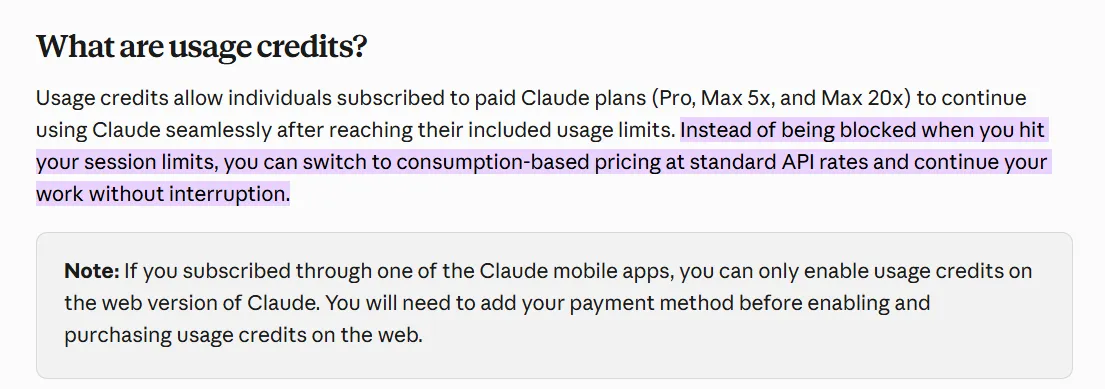
When you hit the wall, you can pay through it. Anthropic calls this usage credits — it used to be “extra usage.”
Available on Pro, Max 5x, Max 20x, and seat-based Team and Enterprise where an admin has enabled it. Billed at standard API rates, charged separately from your subscription.
You prepay. There’s a monthly spending cap, auto-reload, usage alerts, and a $2,000 per day redemption ceiling.
Bundles carry a real discount:
| Bundle | You pay | Discount |
|---|---|---|
| $50 | $45 | 10% |
| $250 | $200 | 20% |
| $1,000 | $700 | 30% |
Two things to know before you turn this on.
Credits don’t change your reset timing. Your plan’s included limit still resets every five hours. You’re buying a bridge, not a bigger plan.
And as I said above, running on credits drops your cache TTL from one hour to five minutes. You’ll burn faster while you’re paying more. Budget for that.
Run /usage-credits in Claude Code to open billing settings. On Team or Enterprise without billing access, that command sends a request to your admins instead.
Error Messages, Decoded
These are the exact strings Anthropic documents. Knowing which is which saves a lot of pointless retrying.
| Message | What it means |
|---|---|
| You’ve hit your session limit · resets 3:45pm | Your 5-hour window. Wait, or buy credits. |
| You’ve hit your weekly limit · resets Mon 12:00am | Your weekly window. Credits are the only bridge. |
| You’ve hit your Opus limit · resets 3:45pm | Model-specific cap. /model to Sonnet and keep working. |
| Repeated 529 Overloaded errors | Not your limit. Anthropic’s capacity. Doesn’t count against quota. |
| Request rejected (429) | Your account’s API rate limit. Different system entirely. |
| Server is temporarily limiting requests (not your usage limit) | Short server-side throttle. Wait a moment. |
| Usage credits required for 1M context | Run /usage-credits, or /model to standard context. |
The 529 one matters. Anthropic is unambiguous: “A 529 is NOT your usage limit and doesn’t count against your quota.” Capacity is tracked per model, so switching with /model often gets you moving again. I’ve watched people burn an afternoon assuming they were capped when Anthropic was simply busy.
Check status.claude.com before you assume it’s you.
What I Don’t Like About This System
I use Claude every working day and I’m still going to say this plainly.
Who Should Upgrade and Who Shouldn’t
Related FAQs
Does Anthropic publish how many messages I get?
No. Free plan message counts “vary based on demand.” Paid plans are expressed only as multipliers. The numeric figures you’ll find online — 40 to 80 hours of Sonnet per week and so on — are from August 2025 and reference retired models.
When exactly does my weekly limit reset?
At a fixed day and time assigned to your account. It doesn’t shift with your billing date. Check Settings > Usage for yours. Some users have published instrumentation suggesting the counter behaves differently in practice; I haven’t replicated that and Anthropic’s stated policy is a fixed weekly reset.
Does switching models reset my limit?
No. Session and weekly windows are shared across models. /model only helps after a model-specific message like the Opus limit.
Is a 529 error my usage limit?
No. It’s Anthropic’s capacity, it’s usually temporary, and it doesn’t count against your quota.
Do Claude Code and claude.ai share limits?
Yes. Web, desktop, mobile, Claude Code and Cowork all draw from one pool.
What are the current models?
As of August 2026: Fable 5, Mythos 5 (limited availability), Opus 5, Sonnet 5, and Haiku 4.5. Older Opus 4.x and Sonnet 4.x versions are still served.
Does Fable 5 come out of my normal limit?
On Max, Team Premium and Enterprise Premium seats you can use up to 50% of your weekly limits on Fable 5 at no extra cost. It shares your allowance rather than adding to it. On Pro and Team Standard it runs only on usage credits.
Can I get a limit reset or a refund if I’m capped?
There’s no published policy for either. The only documented route is contacting support in-product.

Aliakbar Fakhri
The founder of AFFINCO
The Bottom Line
Anthropic sells you a multiplier of a number it won’t tell you. That’s the real story here, and no amount of blog posts guessing at token counts changes it.
So stop guessing. Run /usage for a week, read the attribution breakdown, and find out where your context is actually going. Mine was going to an MCP server I’d forgotten I’d installed.
Measure your own burn. Then buy the plan.
Affiliate Disclosure: This post may contain some affiliate links, which means we may receive a commission if you purchase something that we recommend at no additional cost for you (none whatsoever!)
Similar Posts







About the author:
Aliakbar Fakhri
Founder & CEO of AFFiNCO
I’m Ali, Founder of AFFiNCO, with 15+ years in SEO, paid ads and affiliate marketing.
I run 65+ sites of my own, so every strategy on this blog was tested on my money before it reached you. No guru fluff. Just what actually works.