
TikTok Ad Credits 2026: $6,000 Ad Credit Eligibility Guide

By :
Ali
August 10, 2026

Most pages ranking for this keyword publish a five-tier table with a $4,000 rung in it.
That tier doesn’t exist.
I checked TikTok’s own documentation. The only USD ladder TikTok publishes anywhere runs $200, $500, $1,000, $6,000.
It jumps straight from one thousand to six. There is no $4,000 tier, there never was, and I can show you the page.
I’m an official TikTok for Business partner. My agency runs client spend on the platform, and I’ve claimed these credits on my own accounts.
That doesn’t make me right about everything. It does mean I read the terms instead of copying the site above me in the rankings.
So here’s the actual offer. What TikTok says, where TikTok says it, and the six ways people lose the credit after qualifying for it.
✅ Bottom Line Up Front

TikTok for Business Ad Credit Offers
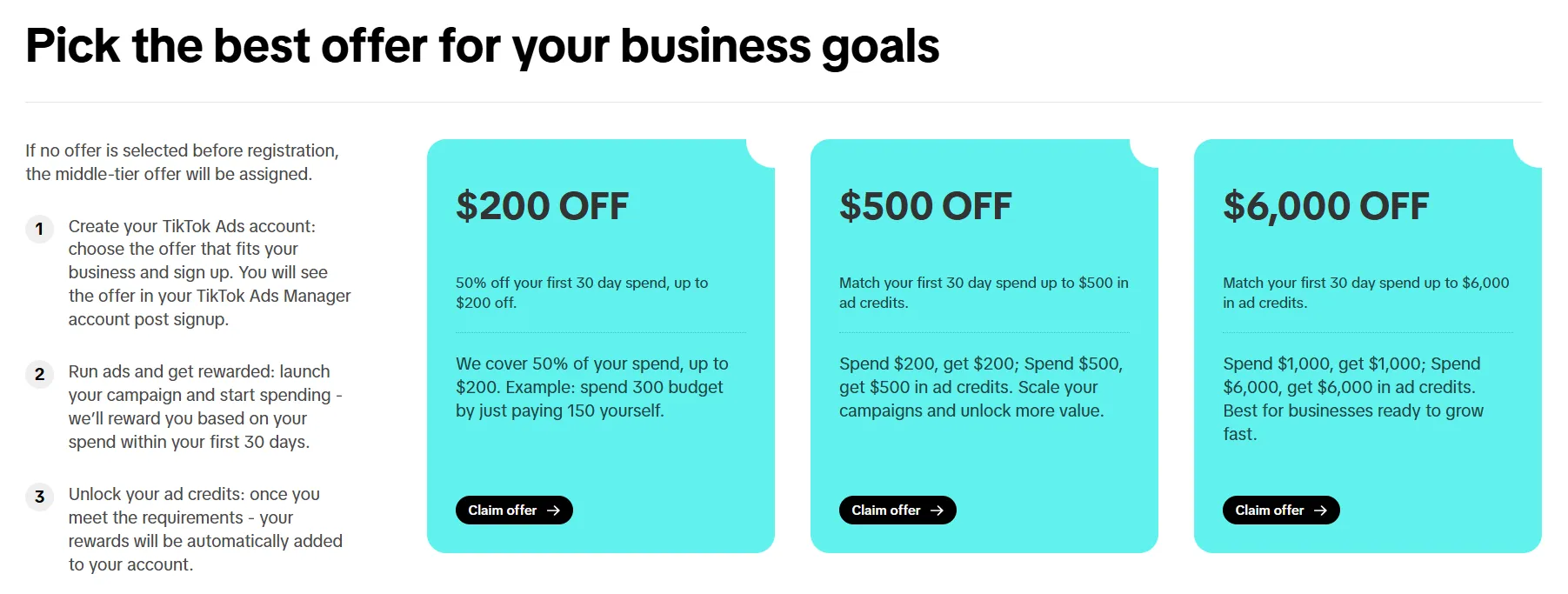
Get up to $6,000 in TikTok advertising credits when you meet an eligible first-30-day spend requirement. Choose the offer that best matches your initial advertising budget.
Get 50% Off Your First 30-Day Ad Spend
TikTok may cover 50% of your qualifying first 30-day advertising spend, with savings capped at $200.
Spend $200, Get $200 in TikTok Ad Credits
Put $200 into an eligible TikTok advertising campaign and receive another $200 in promotional ad credit when the qualifying conditions are met.
Spend $500, Get $500 in TikTok Ad Credits
Match a qualifying $500 first-30-day TikTok ad spend with up to $500 in promotional advertising credit.
Spend $1,000, Get $1,000 in TikTok Ad Credits
Advertisers planning a larger initial campaign can qualify for a dollar-for-dollar $1,000 promotional credit at the eligible spend level.
Spend $6,000, Get $6,000 in TikTok Ad Credits
The highest-value offer from the provided promotion matches up to $6,000 of qualifying TikTok advertising spend with promotional ad credits.
What TikTok Actually Calls This
Not a coupon. Not a promo code.
TikTok’s internal name is the acquisition incentive, documented in a Business Help Center article called “About the incentive program for new advertisers,” last updated June 2026.
That article describes two entirely different mechanics, and knowing which one you’ve been offered changes everything.
- Ladder Coupon (Spend X, Get Y). You accumulate out-of-pocket spend during an earning window. Hit a qualifying tier and the reward is issued the day after the window closes. Top tier pays out within 1 to 3 business days.
- Discount Coupon (a% OFF, up to b). A percentage of each ad charge is deducted automatically. No minimum spend. TikTok subsidises up to a maximum total, then full charges resume.
Here’s the part that should stop you: TikTok’s own worked example in that article is “Spend $100, Get $50” and “Spend $500, Get $300.”
Not a 1:1 match. TikTok’s generic documented example is nowhere near the 100% match most pages promise. The 1:1 ladder is real, but it’s a specific programme, not the default.
And TikTok says this in writing: “Incentives are not guaranteed and may change without notice.”
The Real Tier Table
The only place TikTok publishes an actual USD $6,000 ladder is the WooCommerce Coupon Program help article, last updated November 2025.
| Tier | Spend | Get | Total budget |
|---|---|---|---|
| 1 | $200 | $200 | $400 |
| 2 | $500 | $500 | $1,000 |
| 3 | $1,000 | $1,000 | $2,000 |
| 4 | $6,000 | $6,000 | $12,000 |
Four tiers. Not five. The jump from $1,000 to $6,000 is real and it’s steep.
Most pages covering this offer insert a fabricated $4,000 tier between them. So does Google’s AI Overview for this keyword, which cites TikTok’s help article and then lists numbers that article doesn’t contain.
I don’t know where the $4,000 originated. I know it propagated by copying. I’ve corrected it on my own properties too.
Why You See Different Numbers Everywhere
Because TikTok runs several concurrent offers and doesn’t reconcile them. All of these are live on TikTok-owned properties right now:
| Offer | Where TikTok publishes it |
|---|---|
| Up to $6,000 | getstarted.tiktok.com/ttam-partners, getstarted.tiktok.com |
| $200 / $500 / $1,000 / $6,000 ladder | WooCommerce Coupon Program help article |
| $100 / $500 / $1,500 ladder, 30-day window | getstarted.tiktok.com/tt-acq-registered |
| €100 / €500 / €1,500 | ads.tiktok.com/business/en/how-it-works |
| “Up to $1,000 in ad credits” | Page title of the TikTok budgeting page |
| 50% OFF up to $100, 14 days | getstarted.tiktok.com/ttvalue-coupon |
| ₱ 2.5K / ₱ 12.5K / ₱ 37.5K | Philippines evergreen coupon page |
The honest framing is this: up to $6,000, but what you’re actually offered depends on your entry point, your region, and your account type. TikTok guarantees none of it.
Worth noting where the biggest number lives. The $6,000 headline sits on ttam-partners, a partner-route landing page, while the plain public signup pages headline $1,000 to $1,500.
That’s suggestive. It is not proof that partners get more, and TikTok has never published a comparison.
I’d rather tell you that than pretend I have inside numbers.
Eligibility: The Exact Rules
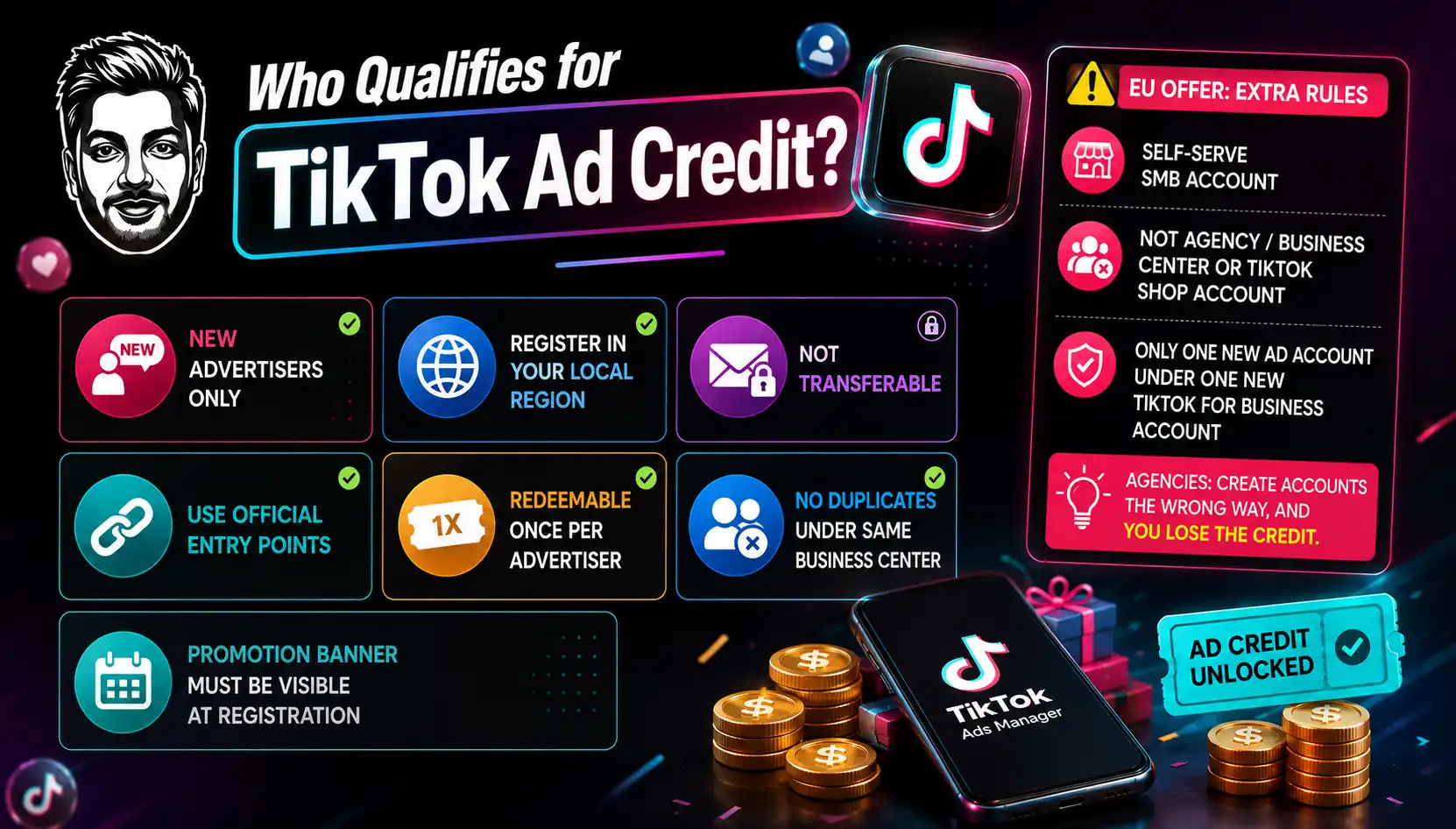
Straight from TikTok’s incentive programme article. I’m quoting because the wording matters.
- “Incentives are reserved for new advertisers. Accounts identified as highly similar to existing or previously active advertisers may not be eligible.”
- “Your TikTok Ads Manager account must be registered in your local region.”
- “This offer is unique to the original recipient, and not valid if forwarded or shared.”
- Redeemable “once per advertiser.”
- “If the existing account has received the coupon, new advertiser account under the same TikTok for Business / Business Center account will not enjoy the incentive again.”
- You must register from official entry points — “landing pages in the domain of getstarted.tiktok.com or ads.tiktok.com.”
- “If the promotion banner disappears before registration, the offer is no longer valid.”
TikTok never defines “highly similar.” Read that as device, payment method and entity fingerprinting, and assume a recycled account won’t work.
The EU offer adds harder rules, and this is the section that catches agencies:
- The advertiser must have “a self-serve SMB account.”
- The account must be “not an Agency/Business Center created account or a TikTok Shop account.”
- “Only one new advertising account under one new TikTok For Business account is eligible.”
Read that second one twice. If your agency spins up the ad account for you, you can disqualify yourself from the credit.
I’ve seen this happen to a client who did everything else right. The account has to be theirs, created by them, through a TikTok entry point.
On business licences: TikTok’s account setup requires a legal business name, country, industry, timezone, phone and payment method. It does not state that a licence document is required to receive credits, and business verification is a separate optional feature. Document requirements vary by country and TikTok doesn’t publish which. I’m not going to tell you no licence is needed, because TikTok doesn’t say that.
How to Claim It, Step by Step
There are two completely different paths. Nearly every article on this topic describes only one, and usually the wrong one.
Path A — Automatic (US, UK, EU, most markets)
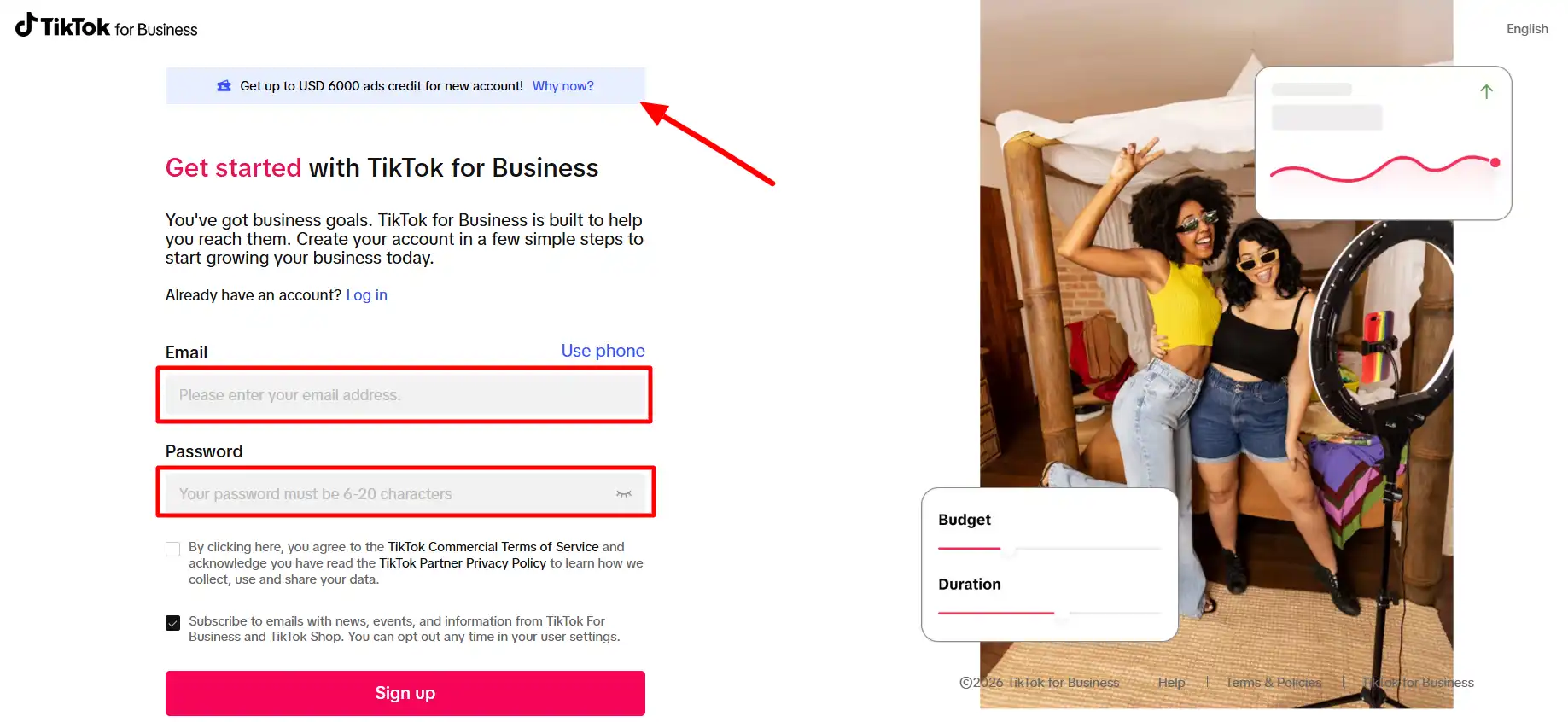
There is no code. The credit attaches to your account at creation.
- Go to an official entry point: getstarted.tiktok.com or ads.tiktok.com. A partner link routes you to one of these.
- Check a promotion banner is displayed before you register. If it isn’t showing, the offer isn’t valid for you. This is the step people skip.
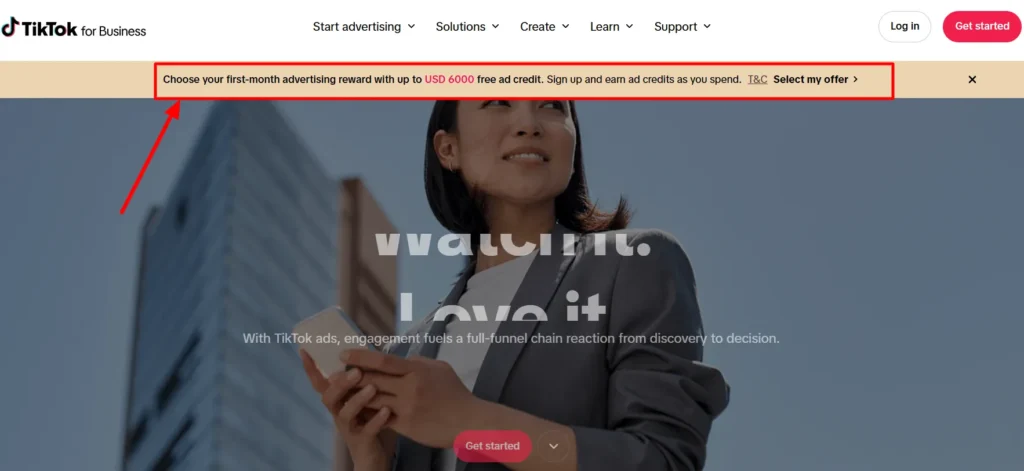
- Create the account. TikTok: “If an offer is displayed during registration, your coupon will be issued immediately upon account creation.”
- Find it via the ticket icon in the upper-right corner of Ads Manager.
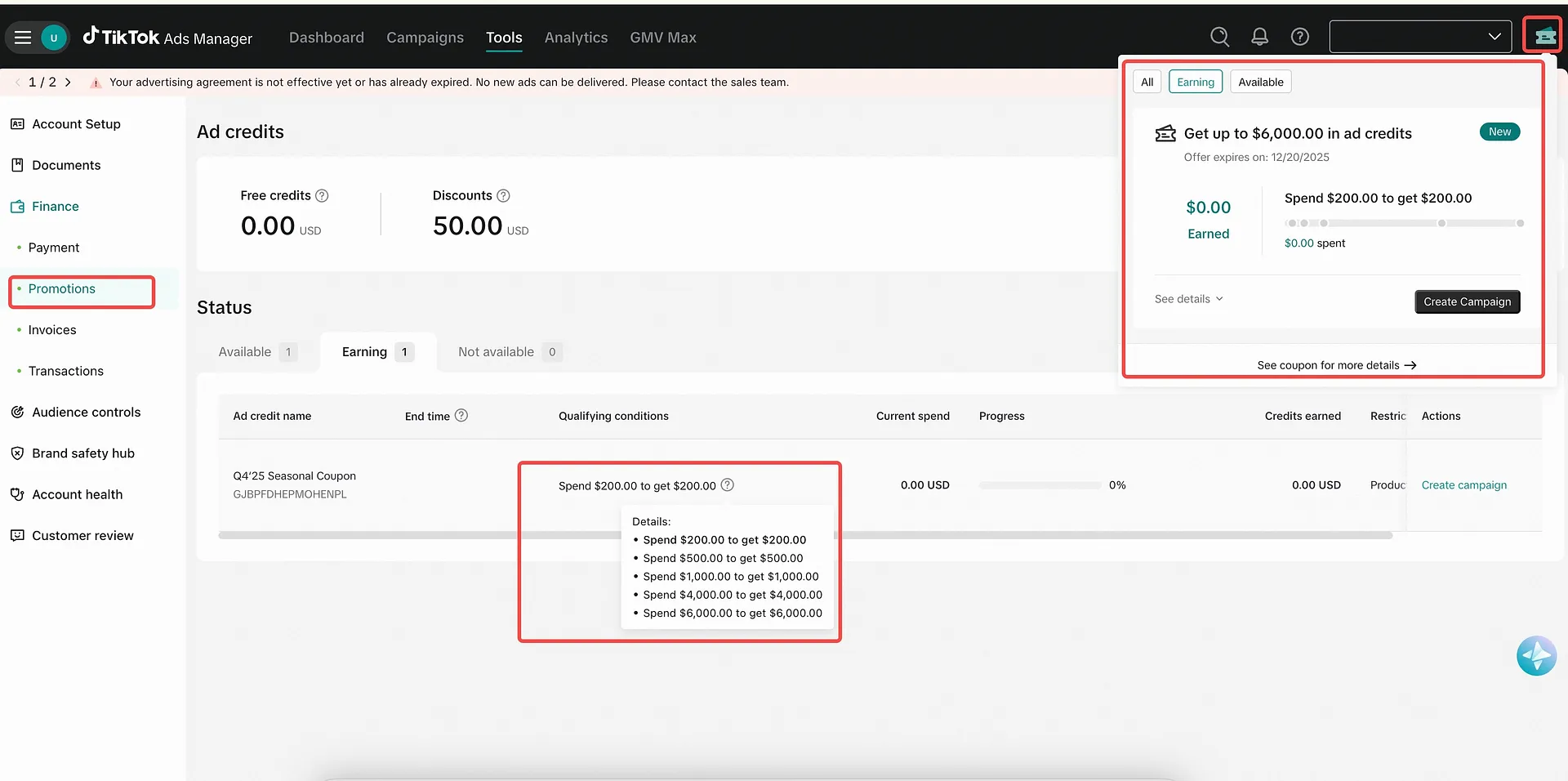
- Manage it at Tools → Payments → Promotions, which shows coupon details, validity, and eligible ad products.
Small inconsistency worth knowing: TikTok’s Promotions help article (updated July 2026) gives the path as Tools → Billing (under Settings) → Promotions tab. Both appear in current docs. Check both.
TikTok Shop sellers go a different way: Seller Center → Marketing → Shop Ads → connect advertiser account. Track at Marketing → Shop Ads → Ads Dashboard → Coupon Progress. In some regions you join manually; in others the coupon issues automatically once you publish your first GMV Max campaign.
Path B — Manual code (six countries only)
Vietnam, Japan, Taiwan, Malaysia, Indonesia, Thailand. That’s the complete list, and it’s stated at the top of TikTok’s own article on activating promotional codes.
- Within 14 days of receiving the code, log into Ads Manager.
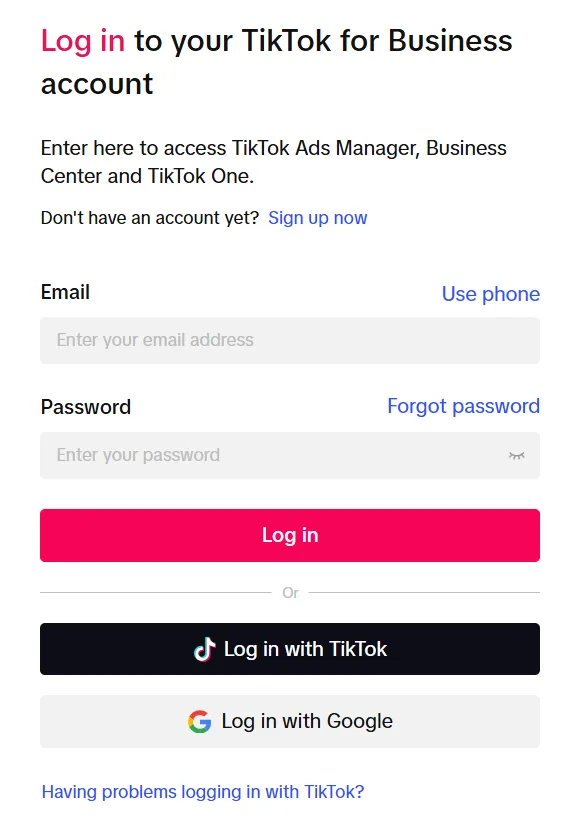
- Tools tab → under Settings, click Billing.
- Click Redeem Coupon, top right.
- Enter the code and click Activate.
The critical line: “We only count the amount you spend AFTER activating the code.” Spend before activation doesn’t count toward the tier. If you’re in one of those six markets, activate before you launch anything.
The Promo Code Question, Answered Precisely
This deserves its own section because it’s where the whole category lies to you.
For the US, UK and EU, there is no coupon code. The mechanism is registration through an official entry point while a banner is showing. That’s it. The only lever you control is which link you register through and whether an offer is live at that moment.
TikTok’s own FAQ says codes “will occasionally be given by TikTok Ads Manager to some advertisers as a part of special offers.” It adds that TikTok only offers them to advertisers who pre-load their ad accounts in advance.
They are not publicly distributed. They cannot be shared — the terms say the offer is “not valid if forwarded or shared.”
So when a site presents you with a code box, or a “click to reveal,” or a code like TIKTOK6000, it’s theatre. There’s nothing behind it.
That’s also why partner links matter here in a way they don’t for most offers. The link isn’t carrying a discount code. It’s routing you to an entry point where an offer is live.
The Terms That Actually Cost People Money
From TikTok’s Advertising Credit Terms and Conditions and the TikTok Coupon Terms. These are the clauses I’d want to know before spending $6,000 to chase $6,000.
- Three credit types exist: Free credit (auto-applies), Assignable credit (you must manually assign it to a campaign, with admin permission), and Conditional credit (only applies when spend, targeting or balance conditions are met). If your credit isn’t applying, check which type you have before you open a ticket.
- Excluded territories: Cuba, Iran, North Korea, Syria, Crimea, Donetsk and Luhansk, plus anywhere else under trade controls.
- Payout timing: within 7 days of crossing the highest spend threshold, or within 7 days of the 30-day accumulation period ending. Top tier lands in 1 to 3 business days.
Why You Didn’t Get Your Credit
TikTok publishes a list of failure reasons — in the WooCommerce article, of all places. It’s the single most useful paragraph in their documentation and it appears on no competitor page I found.
You won’t receive the credit if:
- Your account is “participating in a conflicting promotion.”
- Your account has “already participated” in this promotion.
- Your store or Ads Manager is set up for an ineligible country.
- Your account “may violate our advertising policies.”
- “If your account has been flagged for safety reasons due to irregularities on the account, your ad credit may get blocked.”
Add the ones from the main terms. The banner wasn’t showing when you registered, or you registered somewhere other than an official entry point.
An agency or Business Center created the account. Or you’re in the EU with more than one ad account under the same TikTok For Business account.
There is an appeal route. TikTok’s Promotions documentation notes that “in limited cases, coupons may be suspended due to risk controls; you may submit an appeal within the same interface.” Use it before you assume you’ve been scammed.
On that: users do report problems. There are threads on r/TikTokAds about credits not honouring after $1,500 in spend, and about credits showing as locked during the first 30 days.
Those are user reports, not TikTok policy, and I can’t verify individual cases. But the pattern matches the documented mechanics exactly.
Locked isn’t lost.
Six Claims About This Offer That Are Just Wrong
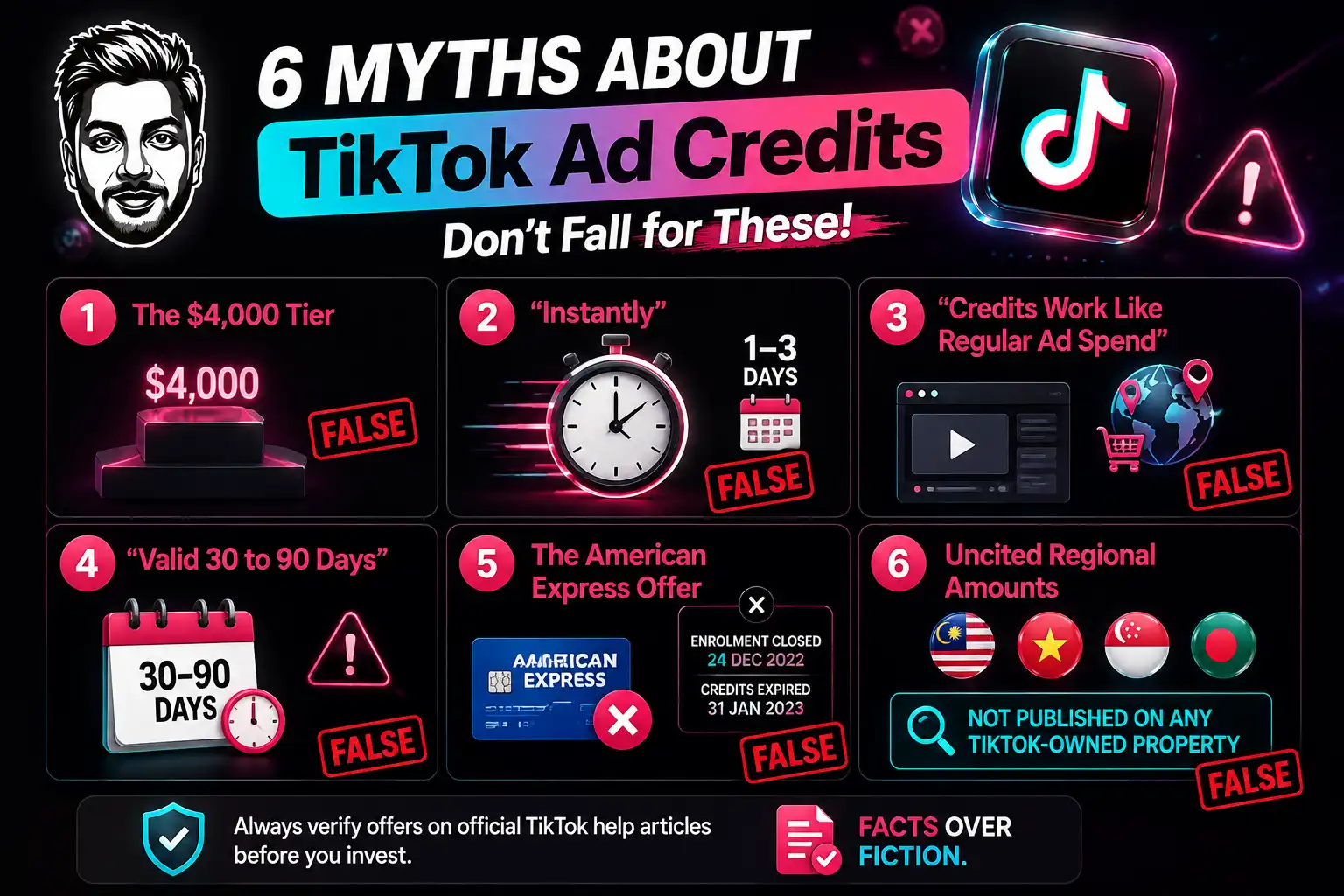
I read every page currently ranking for this term. Here’s what’s circulating that TikTok’s own documentation contradicts.
- The $4,000 tier. Covered above. It isn’t in any TikTok document.
- “Instantly.” Credits are not instant. TikTok says the top tier issues within 1 to 3 business days, and lower tiers only after the earning window closes, then up to 7 days.
- “Credits work like regular ad spend” across all formats. Contradicted by TikTok’s per-coupon usage restrictions on campaigns, products and countries. Check the Usage requirements on your specific coupon.
- “Valid 30 to 90 days.” Invented. TikTok states the expiry date is whatever appears inside your Ads Manager account. There is no published universal window.
- The American Express offer. If you see “Spend $50, Earn $100” presented as a current TikTok promotion anywhere, it’s dead. TikTok’s own help article records enrolment closing 24 December 2022 and credits expiring 31 January 2023.
- Uncited regional amounts. Specific figures in MYR, VND, SGD and BDT circulate widely. I could not find any of them published on a TikTok-owned property. The regional offers TikTok does document are the EU ladder and the Philippines evergreen coupon.
None of this is an attack on anyone. This category is one page copying the next, the copies drift from the source, and almost nobody cites a TikTok help article.
Every claim above has a source at the bottom of this page. Check them against me.
What I Don’t Like About This Offer
I’m a partner and I still think you should walk in with your eyes open.
Who Should Chase This and Who Shouldn’t
FAQs Related to TikTok Coupon
Is the $6,000 TikTok ad credit real?
Yes. TikTok publishes “up to USD $6,000” on getstarted.tiktok.com and a $200/$500/$1,000/$6,000 ladder in its WooCommerce Coupon Program documentation. It’s a 1:1 match, so $6,000 of your own spend is required.
Is there a TikTok ads promo code?
Not for the US, UK or EU. The credit is issued automatically at registration through an official TikTok entry point. A manual Redeem Coupon field exists only for self-serve advertisers in Vietnam, Japan, Taiwan, Malaysia, Indonesia and Thailand.
How do I claim TikTok ad credit?
Register a new Ads Manager account via getstarted.tiktok.com or ads.tiktok.com while a promotion banner is showing. The coupon is issued at account creation and appears under the ticket icon, or at Tools → Payments → Promotions.
Do the credits count toward the next tier?
No. TikTok counts only paid bill amounts and consumed top-ups. Tax and credit spend are excluded.
How long do TikTok ad credits last?
There’s no universal figure. TikTok states the expiry date is shown inside your Ads Manager account. Any site quoting a fixed 30 or 90 days is guessing.
Why is my ad credit locked?
On ladder offers, credits are typically issued after the earning window closes. Locked during the window is expected behaviour, not a fault. Check Coupon Progress or the Promotions page.
Can my agency claim it for me?
In the EU, no — the terms exclude Agency and Business Center created accounts. Have the advertiser create their own account, then grant access.
Is the TikTok Amex offer still live?
No. TikTok’s help article shows enrolment closed 24 December 2022 and credits expired 31 January 2023.
Are TikTok ad credit offers a scam?
The official programme is real and documented. The risk is third-party sites offering to “manage” or “release” credits, or asking for access to your ad account. Register yourself, through TikTok’s own domains, and never hand over account access to claim a credit.

Aliakbar Fakhri
The founder of AFFINCO
The Bottom Line
The offer is real, the biggest number is real, and roughly half of what’s written about it online is not.
You need three things: a genuinely new account, an official entry point with a live banner, and $6,000 you were going to spend anyway. Miss any one of those and the credit isn’t coming, whatever a tier table promises.
Read the terms before you spend. Then spend like the credit isn’t coming.
(my TikTok for Business partner page — routes to TikTok’s official registration)
Affiliate Disclosure: This post may contain some affiliate links, which means we may receive a commission if you purchase something that we recommend at no additional cost for you (none whatsoever!)
Similar Posts




About the author:
Aliakbar Fakhri
Founder & CEO of AFFiNCO
I’m Ali, Founder of AFFiNCO, with 15+ years in SEO, paid ads and affiliate marketing.
I run 65+ sites of my own, so every strategy on this blog was tested on my money before it reached you. No guru fluff. Just what actually works.