

The comparison everyone wanted to run in 2025 is impossible now. Sora is gone.
OpenAI shut the consumer app on 26 April 2026 and the API sunsets on 24 September 2026. The Disney deal collapsed with it. So this test is against what’s actually still shipping.
I ran roughly 200 clips through Kling, Runway and Seedance for real production — eSIM comparison videos for esimdude.com and roamsonar.com, plus client work through my agency. Not prompts about astronauts riding horses. Ads that had to convert.


Here’s what the cost per usable second actually came to, and where each one broke.
✅ Bottom Line Up Front
What I Actually Tested
Real briefs, not benchmarks. Four categories, run across three months.
- Product demonstration. eSIM activation flows — a phone, a hand, a QR code, text appearing. Boring, and the hardest thing to make look clean.
- Travel b-roll. Airports, city streets, someone checking their phone abroad. This feeds most of what we publish on esimdude.com and roamsonar.com.
- Talking-head style UGC. A person to camera, ad-style. Highest conversion rate in our tests, hardest to generate without something going wrong around the mouth.
- Client ad creative. Agency work through AFFiNCO. Multiple variants of the same concept, which is where consistency across shots stops being a nice-to-have.
- I logged every generation: model, resolution, duration, credit cost, and whether the clip made it into a published asset. That last column is the only one that matters and almost nobody publishes it.
- A caveat on my own numbers. This is my hit rate, on my prompts, in my four categories. It isn’t an independent benchmark and I’m not presenting it as one. Your mix will differ.
The Leaderboard Reality
Before my numbers, the public ones — because I’d rather you check me against a source than take my word.
Two credible blind-preference leaderboards exist. Both measure human aesthetic preference, not technical accuracy. Neither is a quality benchmark in the engineering sense.
Artificial Analysis, text-to-video with audio, August 2026:
| Rank | Model | Elo |
|---|---|---|
| 1 | Gemini Omni Flash (Google) | 1,241 |
| 2 | MiniMax H3 | 1,238 |
| 3 | Seedance 2.0 720p (ByteDance) | 1,222 |
| 4 | Wan 2.7 (Alibaba) | 1,160 |
| 8 | Kling 3.0 1080p Pro | 1,109 |
| 10 | Kling 3.0 720p Standard | 1,101 |
| 11 | Veo 3.1 (Google) | 1,091 |
| 16 | PixVerse V6 | 1,077 |
| 18 | Grok Imagine (xAI) | 1,065 |
On image-to-video, Seedance 2.0 takes #1 at 1,198, MiniMax H3 second, Gemini Omni Flash third. Kling 3.0 Pro sits at #12.
Two honest caveats. Kling 3.0 isn’t listed on the Arena leaderboard yet — its newest Kling entry has only about 1,200 votes with a wide confidence interval. And Runway Gen-4.5 doesn’t appear on the audio-enabled views at all, most likely filtered out rather than delisted.
So Kling is not the best AI video generator on the market. Anyone telling you it is hasn’t looked at a leaderboard. It’s roughly eighth, in a field where the top three are Google and two Chinese labs.
That’s not the reason to use it. Cost per usable second is.
Kling 3.0: What It Is Now
The Kling AI video generator is built by Kuaishou, the Chinese short-video company. Kling 3.0 launched 5 February 2026, with a Turbo variant in June.
What it does now:
On duration, sources conflict. Kuaishou’s own launch release says up to 15 seconds. Several technical write-ups say 10 seconds native, extendable. I’ve worked to 10 and treated anything longer as a bonus.
Kuaishou reports 60 million creators and 600 million videos generated since June 2024, with 30,000+ enterprise clients. The company was reportedly closing a raise near an $18 billion valuation in July 2026.
That matters for one practical reason. This isn’t a startup that vanishes next quarter, which is a real risk with several tools in this category.
Cost per Usable Second
Here’s the maths that decided it for me.
Kling credit costs, per second of output:
| No audio | With native audio | |
|---|---|---|
| 720p | 6 credits/s | 9 credits/s |
| 1080p | 8 credits/s | 12 credits/s |
So a 5-second silent 1080p clip is 40 credits. Ten seconds with audio is 120.
Runway Gen-4.5 charges 12 credits per second, flat. A 5-second clip is 60 credits. On Runway’s Standard plan at 625 credits a month, that’s about ten clips.
The plans, side by side:
| Kling | Runway | |
|---|---|---|
| Free | 66 credits/day | 125 credits, one-time |
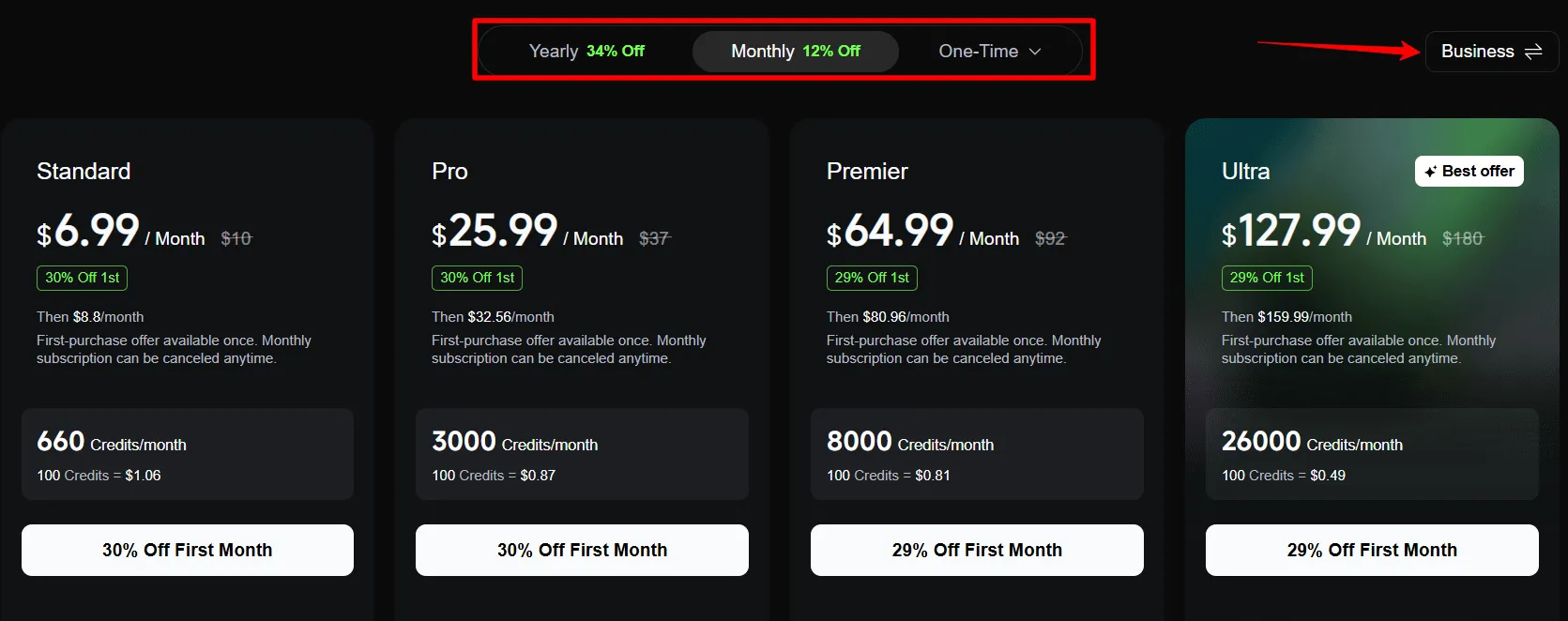
| Entry | ~$7–10/mo, 660 credits | $15/mo ($12 annual), 625 credits |
| Mid | ~$26–37/mo, 3,000 credits | $35/mo ($28), 2,250 credits |
| High | ~$65–92/mo, 8,000 credits | $95/mo ($76), 9,500 credits |
| Top | ~$128–180/mo, 26,000 credits | Enterprise |
A note on Kling’s prices. Sources split cleanly into two groups — around $6.99 and around $10 for the entry tier. That pattern says promotional first-term pricing versus renewal. The credit allocations are consistent everywhere, so I’d trust those and check the dollar figure at checkout.
The free tier gap is the real story. Kling gives 66 credits a day, refreshing. Runway gives 125 credits once, and never again. If you want to test properly before paying, that’s not close.
Where it lands. Draft at 720p without audio on Kling and you’re at 6 credits per second against Runway’s 12. Double the output for the same spend, before you factor in hit rate.
Where Each Model Broke
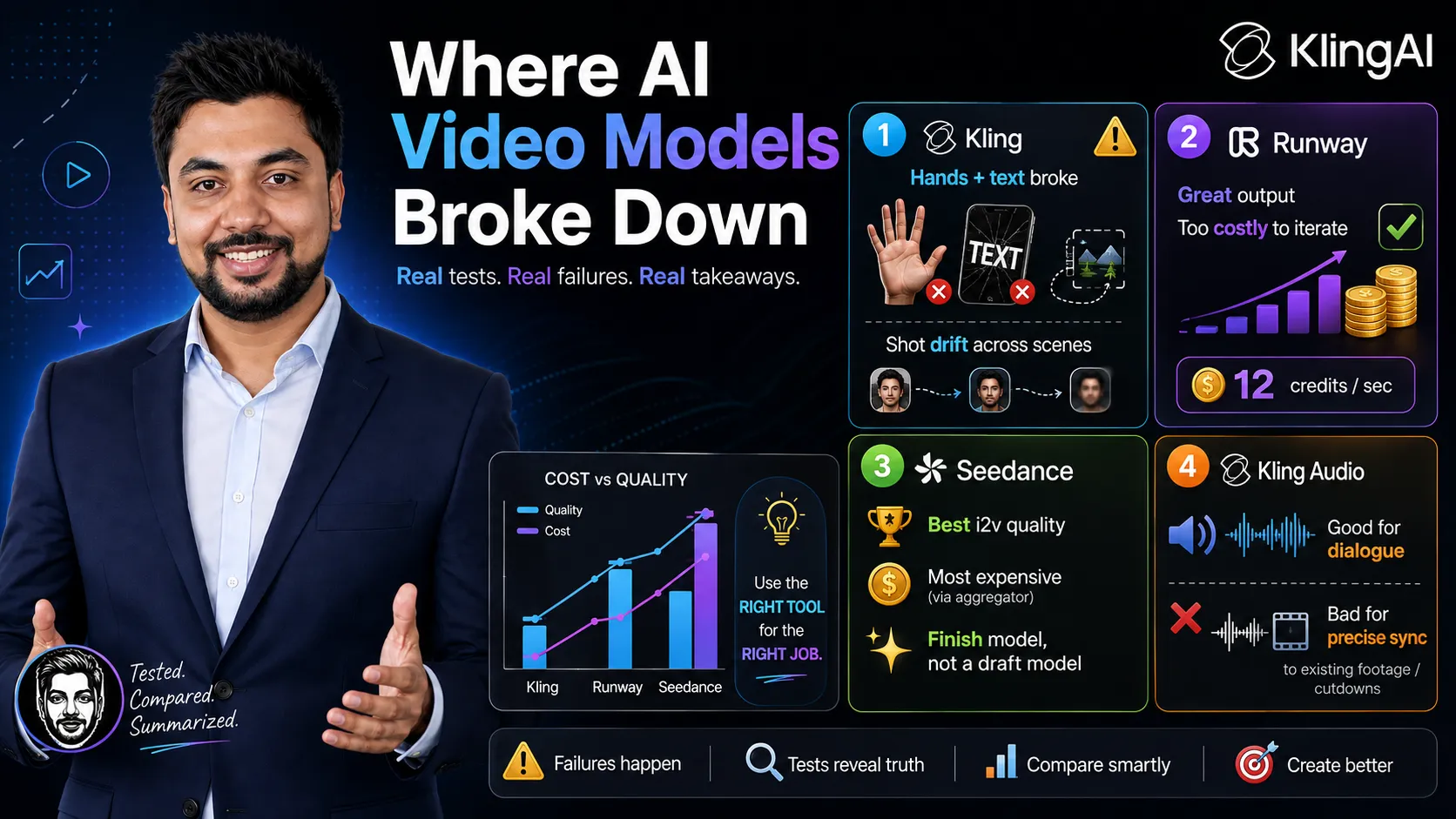
Every model failed at something specific. This is the useful part.
Native audio on Kling is better than I expected for dialogue, and useless for anything requiring precise sync to existing footage. Fine for a standalone ad. Not fine for a cutdown.

Kling AI Image to Video Generator
This is where Kling earns its place in my stack, and it’s worth its own section because the workflow is different.
Text-to-video is a lottery. You describe a scene and hope. Image-to-video is a controlled process — you generate or shoot the exact frame you want, then animate it.
For the eSIM sites, that meant generating a clean product still first, then feeding it to Kling with a short motion prompt. Hit rate went up substantially compared to describing the same shot from scratch.
The specific workflow that worked:
- Generate the still at high quality — I use Nano Banana Pro or Seedream through Higgsfield for this
- Feed it to Kling as the first frame
- Prompt only the motion, not the scene. “Slow push in, hand enters frame from right” beats a paragraph describing everything
- Generate at 720p, no audio, for the draft
- Regenerate the survivors at 1080p
Step 3 is the one people get wrong. If the image already contains the scene, describing it again gives the model permission to change it. Prompt the movement only.
Kling ranks #12 on image-to-video against #8 on text-to-video, so it isn’t the strongest option on paper. In practice the price difference meant I could run four attempts where Seedance bought me one, and four attempts beat one better attempt more often than not.
The Rest of the Field
Quick, honest reads on the alternatives, because “best AI video generator” depends entirely on the job.
- Google Gemini Omni Flash — currently #1 on both leaderboards for text-to-video. Multimodal input, conversational editing, SynthID watermarking. Access comes through Google’s AI subscriptions rather than a standalone plan, which makes cost comparison awkward.
- Seedance 2.0 and 2.5 (ByteDance) — #1 on image-to-video and top three on text-to-video. If quality is the only constraint, this is the answer. Seedance 2.5 was announced in late July with 4K and native audio, API in pre-release.
- MiniMax H3 / Hailuo AI video generator — released 31 July 2026, second on text-to-video. Omni-modal with native stereo audio, up to 2K and 15 seconds. MiniMax claims under a third of the per-second cost of mainstream models. Worth watching closely.
- Wan 2.7 (Alibaba) — very strong price-to-performance, first-frame control, 15-second clips. Earlier Wan versions were open weight; 2.7’s open-weight status is not confirmed, so don’t plan around self-hosting it.
- Luma AI video generator — Ray3 supports native 16-bit HDR with EXR export, which is genuinely differentiated for anyone with a real post pipeline. Ray3.14 is faster and cheaper but drops character reference and native audio. Plus starts at $30/month with no free tier.
- Grok AI video generator (xAI) — debuted at #1 on image-to-video in June 2026, now around #4. Around $0.08 per second, 1 to 15 seconds, native one-pass audio including dialogue. Preset voices only.
- PixVerse V6 — the cheapest credible per-second option I found, at roughly $0.025/s on some hosts. Free tier gives 90 credits at signup plus 60 a day. Good for volume social, weaker for hero creative.
- Pika Labs AI video generator — effects-first workflow, and commercial use from the $8 Basic plan, which is the cleanest commercial entry point in the category. But it sits near the bottom of the rankings on raw quality. Pick it for the effects, not the fidelity.
- Meta’s muse-video and Black Forest Labs’ flux-3-video — both new, both landed in the Arena top four. The field is not settled.
Are Chinese AI Video Generators Actually Ahead?

You’ll read that Chinese models have taken over AI video. The honest answer is more interesting than either version of the argument.
That leaves Google as effectively the only Western lab competing at the frontier of video.
When Runway — the company that defined this category — starts selling you Kling access inside a Runway subscription, the argument is over.
The Commercial Rights Problem
This is the section agencies need, and I haven’t seen it covered anywhere.
Kling’s marketing says every paid tier includes commercial use rights and watermark-free export. The free tier is personal use only, watermarked.
Kling’s terms of service say something different.
There’s a third clause worth knowing. Section 4.7.1 grants Kling a non-exclusive, royalty-free right to host, reproduce, modify, publicly display and distribute both your inputs and your outputs.
What I can tell you is that the pricing page and the terms don’t agree, and if you’re producing client work at scale you should get the commercial permission confirmed in writing rather than relying on a marketing bullet.
For comparison, Pika grants commercial use explicitly from its $8 plan. Cleaner, cheaper, and unambiguous.
What I Don’t Like About This Build
How I’d Run This Stack
Here’s the actual setup after 200 clips.
| Job | Model | Why |
|---|---|---|
| Drafting and iteration | Kling 3.0, 720p, no audio | 6 credits/s. Cheapest way to find the shot |
| Hero shot, final render | Seedance 2.0 | Best image-to-video quality available |
| Anything needing HDR or a real post pipeline | Luma Ray3 | EXR export, 16-bit |
| High-volume social variants | PixVerse V6 | Cheapest per second that’s still usable |
| Stills to feed image-to-video | Nano Banana Pro or Seedream | Control the frame before you animate it |
And the layer above all of it. I run most of these through Higgsfield rather than holding five separate subscriptions. One credit balance, model chosen per shot. If you’re only using one model, go direct and pay less.
The principle underneath: draft cheap, finish expensive. Almost everyone does it backwards, burns their budget on premium drafts, and has nothing left for the shot that ships.
Who Should Use What
FAQs Related to Kling AI
Is Kling AI free to use?
There’s a free tier with 66 credits a day, which refreshes — the most generous free allowance among the major tools. Output is watermarked and personal use only.
How many videos can I make with 660 credits?
At 720p with no audio, roughly 110 seconds of finished video — about twenty 5-second clips. Add audio and that drops to around 73 seconds. Retries come out of the same pool.
What happened to Sora?
OpenAI discontinued it. The web and app experiences closed on 26 April 2026, and the API shuts down on 24 September 2026. No successor has been announced.
Which AI video generator is the most realistic?
On blind human preference, Google’s Gemini Omni Flash leads text-to-video and ByteDance’s Seedance 2.0 leads image-to-video. Kling sits around eighth. Realism and value are different questions.
Can I generate video with sound?
Kling generates native audio including multi-character dialogue across five languages. It costs about 1.5x the silent rate. MiniMax H3 and Grok also produce native audio in one pass.
How long can Kling videos be?
Kuaishou’s launch release says up to 15 seconds. Independent write-ups report 10 seconds native with extension. Plan for 10 and treat more as upside.
Do I need a subscription for commercial use?
The paid tiers are marketed with commercial rights, but Kling’s terms contain a clause requiring written permission for commercial use and don’t specify which tier lifts it. For agency work, get it confirmed in writing.
What’s the cheapest way to test several video models?
An aggregator with one credit balance, rather than several subscriptions. That’s the case for Higgsfield if you use three or more models. One model, go direct.

Aliakbar Fakhri
The founder of AFFINCO
What 200 Clips Taught Me
The best model is rarely the right model.
Kling isn’t top of any leaderboard I can find. It still produced more usable seconds per dollar than anything else I ran, because ad creative is an iteration problem and iteration is priced per second.
Pick your model by what the shot has to do, not by what came top of a ranking someone posted on X.
Affiliate Disclosure: This post may contain some affiliate links, which means we may receive a commission if you purchase something that we recommend at no extra cost to you. Commissions never change our testing or recommendations.
Similar Posts





About the author:
Aliakbar Fakhri
Founder & CEO of AFFiNCO
I’m Ali. Since 2014 I’ve been building and scaling SEO, affiliate and AI growth systems, today across 29+ live domains.
Every strategy on this blog was tested on my own sites and budgets before it reached you. No guru fluff. Just what actually works.