
I Built My First MCP Server in 30 Minutes Without Writing Code

By :
Ali
August 13, 2026
Almost every tutorial on how to build an MCP server is written by someone who could have written the server by hand.
I couldn’t. That’s why this one is worth reading.
I don’t write code. I’ve said that on this site before and it hasn’t stopped being true. I still shipped a working MCP server for one of my properties in about thirty minutes.
Not a demo. A server that answers real questions against a real database, in Claude and ChatGPT, today.

Here’s exactly how, including the prompts I used and the four things that broke.
✅ Bottom Line Up Front
What an MCP Server Actually Is (60 Seconds, Then We Build)
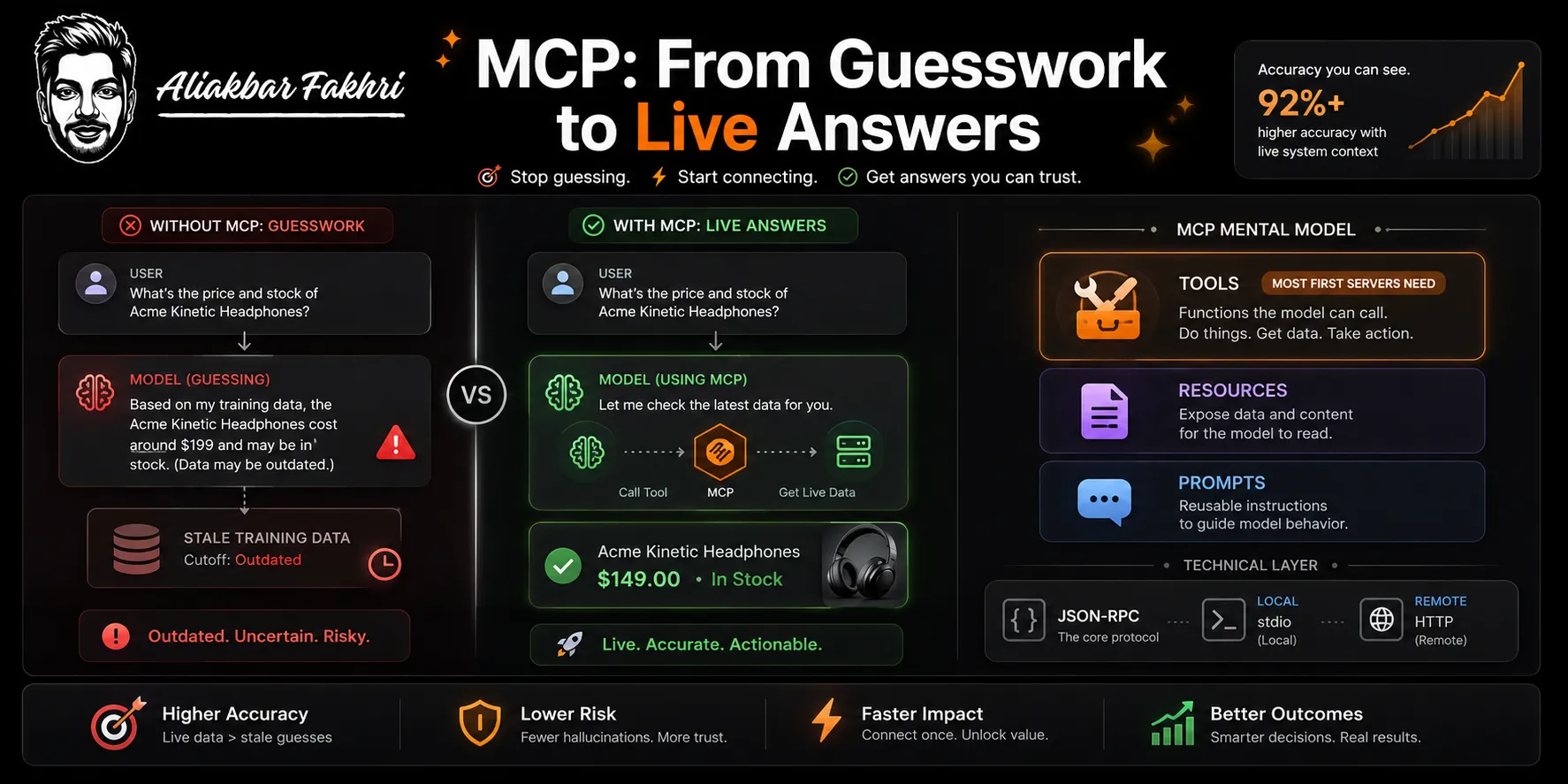
MCP is a protocol that lets a model call your system directly. That’s the whole idea.
Without it, a user asks Claude about your product and Claude guesses from training data. With it, Claude calls your API and reads the real answer.
The Model Context Protocol defines three things a server can expose. Tools are functions the model can call. Resources are data it can read.
Prompts are templates you hand it. Most first servers only need tools.
Under the hood it’s JSON-RPC over one of two standard transports, per the current spec revision dated 28 July 2026. Local servers use stdio. Remote servers use Streamable HTTP.
That’s the entire mental model.
What We Built and Why

eSIMAdvice compares eSIM providers, plans and prices. Somebody flying to the US for a week wants the cheapest plan with enough data. Normally that’s four tabs, a comparison table and a coupon hunt.
We already had the APIs and the database. The data was fine. The interface was the problem.
So the question became simple. Why make people come to a website when the model they already have open can answer for them?
The MCP server does this. The user connects it once, then types in plain language:
“Find the best eSIM provider for a 7-day US trip, limited data, and show me any active coupons.”
The server takes that request, queries our plan database, ranks the options against the constraints, and hands structured results back to Claude. Claude formats the answer.
One turn. No tabs. The comparison happens where the user already is.
That’s the shift worth understanding. Your website stops being the destination and becomes the backend.
The 30-Minute Build
Search how to build MCP server setups and you land on SDK docs. Those docs assume you can code.
Here’s the version that doesn’t. It’s shorter than you expect.
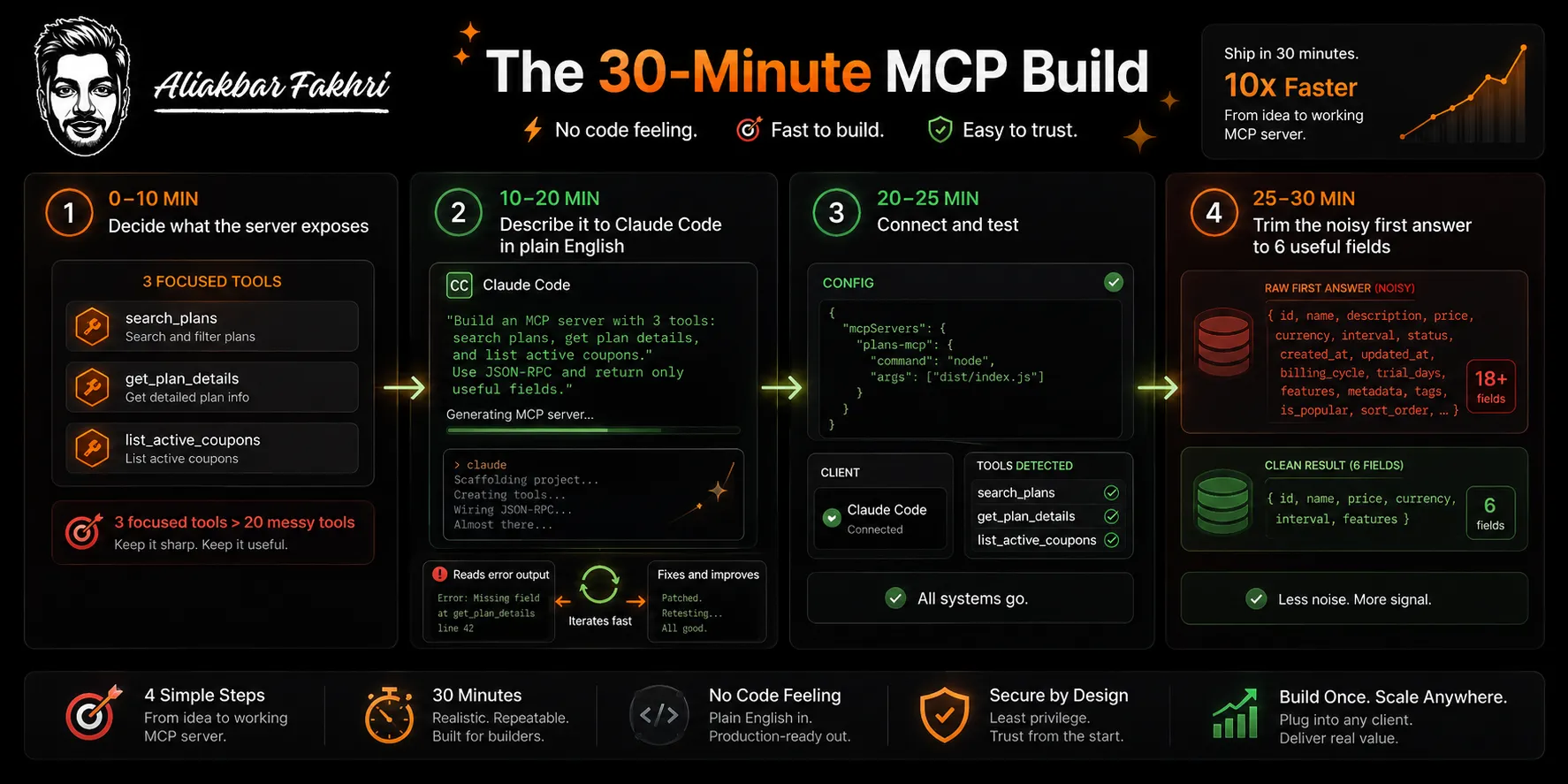
- Minutes 0–10: decide what the server exposes. This is the only part that needs your brain. I wrote down three tools before touching Claude Code — search plans by country and duration, get details for one plan, list active coupons for a provider.
Three tools. Not thirty. A server that does three things well beats one that does twenty badly, because the model has to choose between them and choice is where it fails.
- Minutes 10–20: describe it to Claude Code. I opened a new folder, ran Claude Code, and described the server in plain English. Full prompt in the next section.
It scaffolded a Python MCP server, wrote the tool definitions, wired them to our API, and generated the config. I read the output. I didn’t write it.
- Minutes 20–25: connect and test. Claude Code added the server to my config file and restarted the client. The tools appeared. I asked it a real question.
- Minutes 25–30: fix the first answer. The first response was technically correct and useless — it returned every field in our database, so Claude drowned. I told Claude Code to trim the response to six fields. It did.
That’s the build. The reason it works isn’t that MCP is trivial. It’s that a model reading its own error output iterates faster than I could type.
The Prompts I Actually Used
This is the part other tutorials skip. Copy these and change the nouns.
Prompt 1 — the scaffold.
Build me a Python MCP server using the official SDK. It connects to my REST API at [BASE_URL] and exposes three tools:
search_plans — takes country, duration in days, and a data tier of limited or unlimited. Returns matching eSIM plans ranked by price.
get_plan_details — takes a plan ID, returns full details.
list_coupons — takes a provider name, returns active coupon codes.
Use stdio transport. Read the API key from an environment variable, never hardcode it. Write clear tool descriptions — a model will read them to decide which tool to call. Add error handling for timeouts and empty results.
Prompt 2 — the descriptions. Tool descriptions are the actual interface. The model picks tools by reading them.
Rewrite each tool description as if explaining to someone who has never seen my API. State what it returns, what required arguments mean, and when to use this tool instead of the others. Be specific about units — days, USD, GB.Prompt 3 — the trim. My first version returned everything.
The search_plans response is too verbose and it's flooding the context. Return only: provider name, plan name, price in USD, data allowance, validity in days, and the checkout URL. Cap results at ten. Add a total match count so the model knows if there were more.Prompt 4 — the test loop. The one that saves the most time.
Connect this server to my client, call each tool with realistic arguments, and show me the raw responses. If any tool errors or returns an empty result, diagnose and fix it, then test again. Repeat until all three return valid data.That last prompt is the difference between thirty minutes and a lost afternoon. Make the model test its own work. It’s better at reading stack traces than you are.
Prompt 5 — hardening, once it works.
Add input validation so bad arguments return a clear error instead of throwing. Add a timeout on every API call. Log each tool call with its arguments and duration to a local file so I can see what the model is actually asking for.That log is worth building on day one. It’s how I found out which questions users actually ask.
Local, Remote and Hosted
Three deployment shapes, and people confuse them constantly.
| Type | Transport | Runs where | Good for |
|---|---|---|---|
| Local MCP server | stdio | The user’s own machine, launched by their client | Personal tools, filesystem access, anything with local credentials |
| Remote MCP server | Streamable HTTP | Your infrastructure | Products with many users, shared data, anything you update centrally |
| Hosted MCP servers | Streamable HTTP | A third party’s infrastructure | Skipping ops entirely |
Start local. Every local MCP server is a stdio process your client launches, which means no deployment, no auth, no uptime to worry about.
Build it locally, prove it’s useful, then move it. Remote MCP servers are the right end state for a product like eSIMAdvice — every user shouldn’t run their own copy of my database connector. But that’s a week-two problem, not a day-one one.
The migration is real work. Streamable HTTP means you own authentication, rate limiting and uptime. Don’t start there.
Which Model to Build With
I’ve built these with several and the differences are real.
- Claude Opus 5 is my default for this. It’s the model Anthropic recommends for complex agentic coding, and it holds a multi-file server in its head without losing the thread.
- Claude Opus 4.8 still does the job and I used it for earlier builds. If it’s what you have, it’s enough.
- GPT-5.6 is what my team uses for some client builds, through Codex. Launched July 2026, and it’s strong at the iterate-until-it-runs loop. There’s also GPT-5.6 Sol, a preview of the next generation, if you have access.
Honestly? For a three-tool server, the model matters less than the prompt. Any current frontier model does this.
Where it matters is at fifteen tools and real auth. That’s when the weaker ones produce code that runs and is wrong.
Done properly, a first server is a one-hour task. Not a weekend.
What to Build an MCP Server For
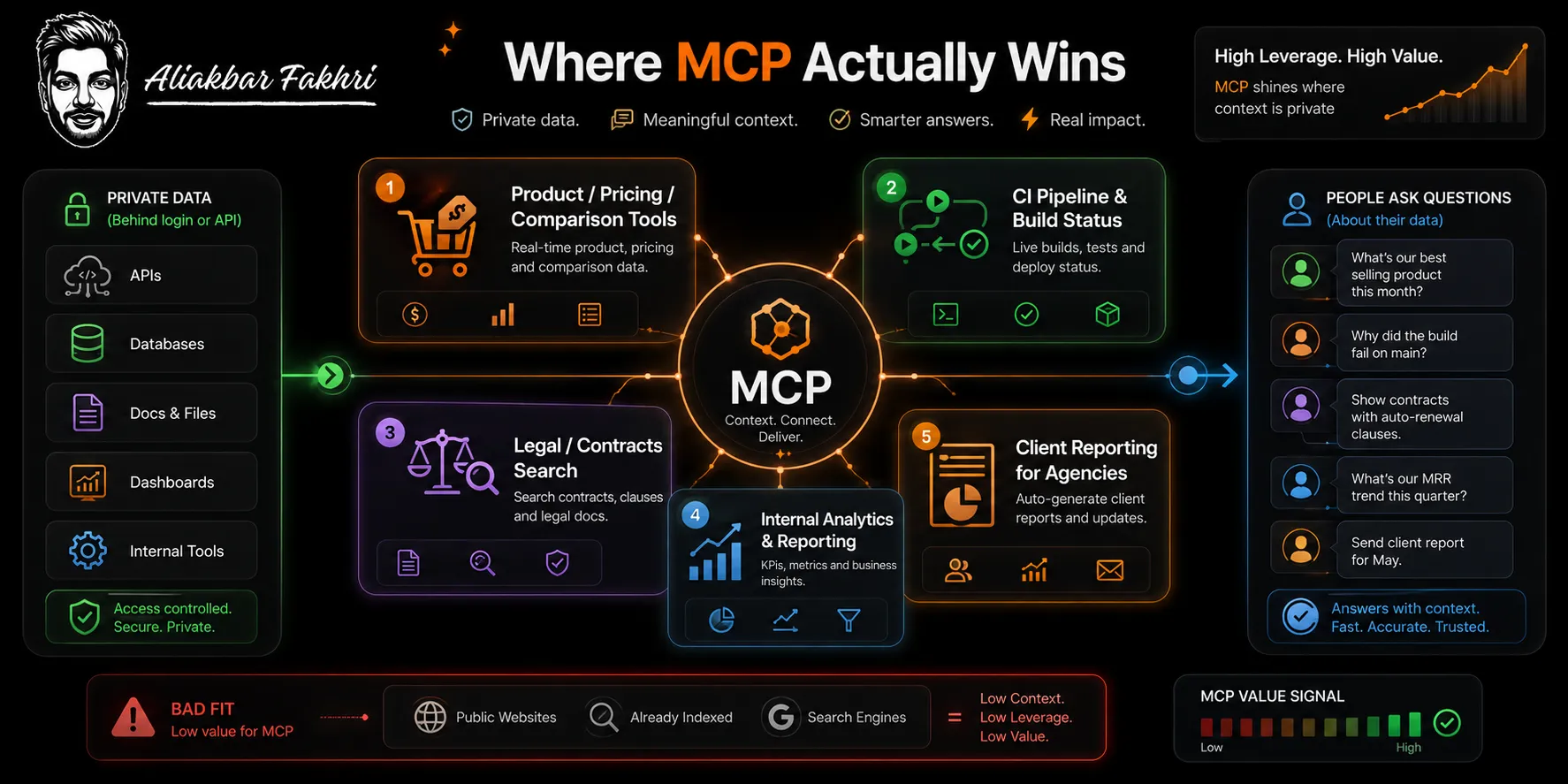
The pattern that works: you have data behind a login or an API, and people ask questions about it.
Some MCP servers example ideas worth stealing:
- Your own product. Anything comparison, catalogue or pricing based. If users currently filter a table on your site, that’s a tool. This is what we did.
- Your CI pipeline. Which builds failed, why, and what changed. Instead of opening the dashboard, ask. Deployment status, test failures, recent commits — three tools, same as mine.
- A legal or contracts app. Search clauses across a contract library, pull precedent, check a term against a policy. Lawyers live in documents and hate interfaces. This is one of the highest-value categories I’ve seen and it’s barely touched.
- Internal analytics. Revenue by channel, churn last month, top campaigns. Every team has someone who’s the only person who can pull that number. A server retires that bottleneck.
- Client reporting. We build these for agency clients now. Ask the model for a client’s performance and it queries the real data instead of guessing.
The bad candidates are just as clear. Don’t build one for data that’s already public and well indexed.
The model can already search. You add nothing.
What Broke
Who Should Build One, Who Shouldn’t
One more. If you’re building it to say you built one, skip it.
I’ve installed plenty of MCP servers that existed to be mentioned in a launch post. They get deleted.
FAQ Related to Building MCP Server
Do I need to know Python to create an MCP server?
No. I don’t write Python. You need to read output critically and describe what you want precisely. Python is the most common choice because the SDK is mature, but the model writes it.
Is creating an MCP server different from creating a plugin or an integration?
Yes. A plugin is built for one product’s interface. An MCP server is built once against an open protocol and works in every client that speaks it.
How long does it really take?
Thirty minutes for a working local server with a few tools. About an hour to make it good. Days if you need remote hosting with real authentication.
What’s the difference between a local and a remote MCP server?
Local runs on the user’s machine over stdio and is launched by their client. Remote runs on your infrastructure over Streamable HTTP and serves many users. Start local.
Can ChatGPT use MCP servers too?
Yes. MCP is an open protocol, not an Anthropic-only feature. Build once, connect to any client that supports it.
Is this an MCP server tutorial I can follow without a developer?
Up to the point of deployment, yes. Local servers need no ops. Once you want a remote server on your own infrastructure, get someone who knows auth involved.

Aliakbar Fakhri
The founder of AFFINCO
The Part That Actually Matters
The build isn’t the hard part. Thirty minutes proved that.
The hard part is deciding what three things your system should let a model do. No model does that for you, and getting it wrong costs you more time than writing the code ever would.
Spend ten minutes on that decision. Spend twenty on the build.
We build these for clients now. Book a 30-minute call and I’ll tell you whether your data is worth exposing this way — or whether you’d be shipping a server nobody connects.
Stop reading MCP explainers. Ship three tools.
Evidence beats hype. Every time..
Affiliate Disclosure: This post may contain some affiliate links, which means we may receive a commission if you purchase something that we recommend at no additional cost for you (none whatsoever!)
Similar Posts






About the author:
Aliakbar Fakhri
Founder & CEO of AFFiNCO
I’m Ali, Founder of AFFiNCO, with 15+ years in SEO, paid ads and affiliate marketing.
I run 65+ sites of my own, so every strategy on this blog was tested on my money before it reached you. No guru fluff. Just what actually works.